



Apartment PPC – Harness The Power of a Multifamily Google Ads Strategy
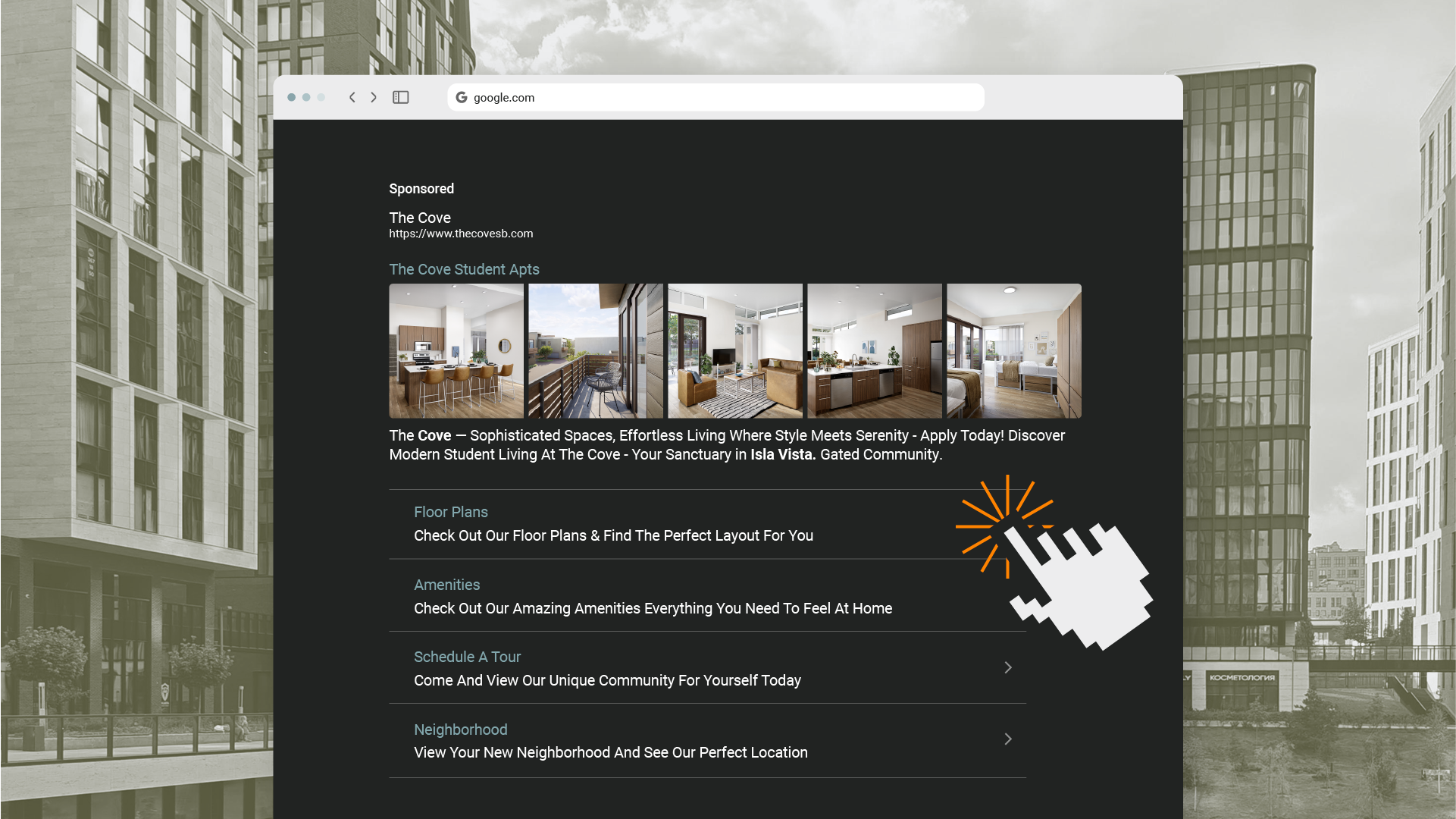


Table of Contents
Nearly 8.5 billion searches happen on Google every single day, and the search engine results page (SERP) is crowded and competitive. For multifamily marketers, this isn’t just a statistic—it’s a daily battle for visibility. How do you ensure your community stands out at the exact moment a prospective resident is looking for their next home? The answer lies in a meticulously crafted apartment PPC strategy.
Multifamily PPC, or pay-per-click advertising, is a digital marketing strategy that allows you to place targeted ads for your community across search engines, apps, and maps. Unlike traditional marketing, you only pay when someone is interested enough to click. This strategy is a hyper-targeted digital billboard, placed directly in the path of your ideal future resident.
This guide will take you from A to Z, breaking down every critical component of a successful Google Ads campaign for apartments. We will cover strategy, campaign types, keywords, common misconceptions, and everything in between to give you the blueprint for turning clicks into leases.
Key Takeaways
- Unlike long-term strategies like SEO, a well-executed apartment PPC campaign is designed to generate qualified leads and drive traffic from Google right now, making it essential for lease-ups and stabilizing properties.
- A typical PPC budget is upwards of $1500 per month, but is ultimately determined by your specific leasing goals and market competition—not just whether your community is luxury or non-luxury.
- A successful campaign relies on a meticulous setup. This includes tightly themed ad groups, a strategic mix of Phrase and Exact match keywords, and precise conversion tracking to ensure every dollar is accounted for and optimized.
- Apartment PPC is not a “set it and forget it” channel. Continuous management including identifying negative keywords, monitoring performance, and optimizing for a higher Quality Score is critical for maximizing your return on ad spend.
How multifamily PPC fits into your digital marketing strategy
The most successful communities deploy a multifaceted digital marketing strategy. This integrated approach includes everything from custom branding and websites to search engine optimization (SEO), paid social, geofencing, and reputation management. Each channel plays a distinct role in guiding a prospect through the digital marketing funnel.
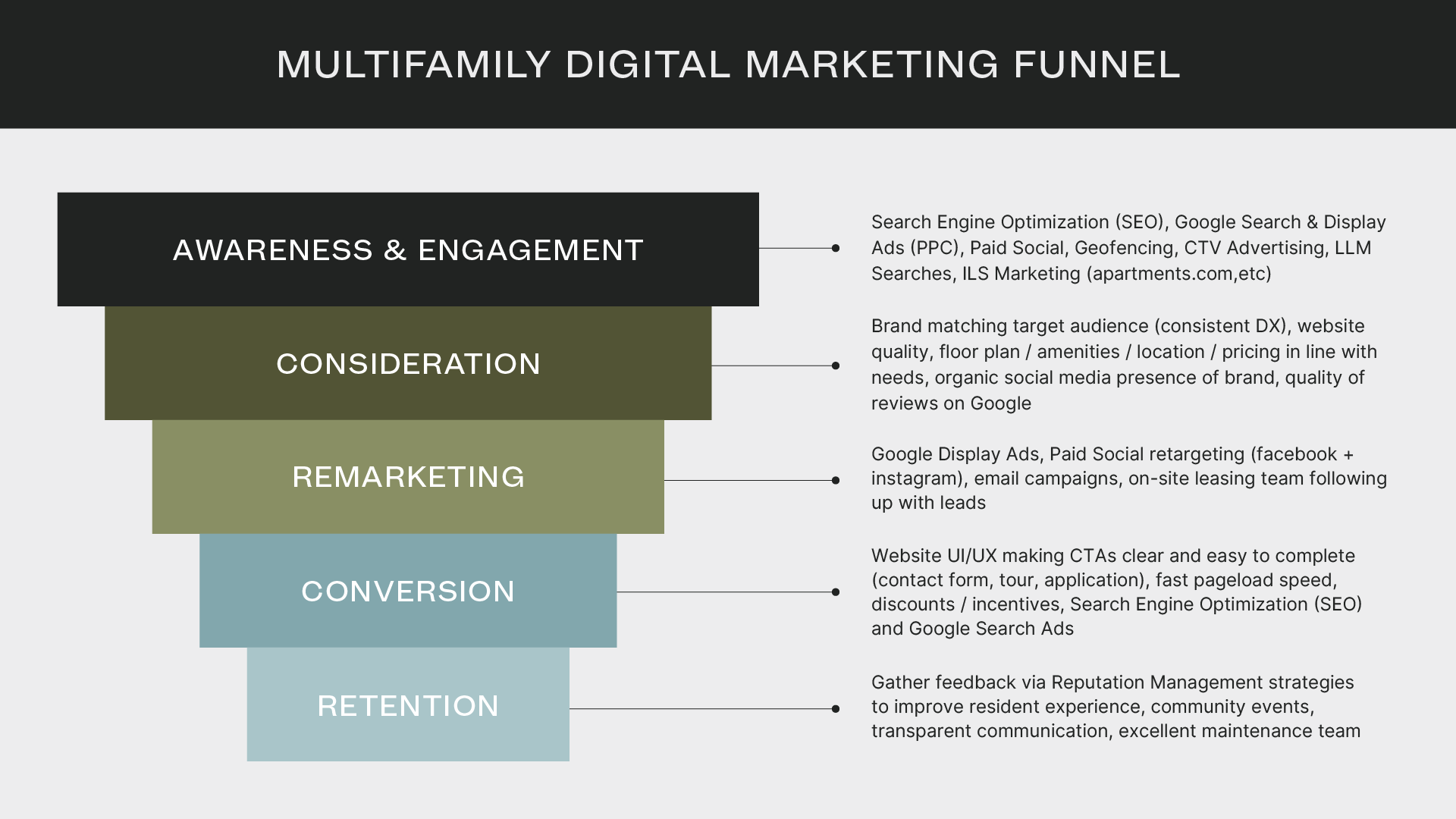
Google Ads lives in the Awareness, Engagement, Remarketing, and Conversion stages of that funnel. It’s your engine for capturing immediate interest, driving prospects to your website, and converting them into qualified leads.
This is where PPC stands apart from long-term strategies like SEO. While SEO is crucial for building sustainable organic traffic, apartment PPC is a short-term, high-impact strategy designed to generate leads from Google Search right now.
How do I know if PPC is right for my community?
Running Google Ads puts your community website at the top of search results, boosting brand visibility and ensuring potential residents see your ads—not your competitors’. For prospects unfamiliar with your brand, ads targeting non-branded search terms are a powerful tool for building awareness and attracting new renters.
A targeted PPC strategy is particularly effective for:
- Seasonal Apartments: Drive demand during peak leasing seasons for student or workforce housing.
- New Builds and Lease-Ups: Generate immediate buzz and fill units quickly.
- Post-Renovation Promotions: Showcase new amenities and management changes to a fresh audience.
- Stabilizing Distressed Properties: Execute one-time sprints to boost occupancy.
- Augmenting ILS Lead Flow: Supplement leads for larger portfolios and reduce dependency on third-party sites.
How to create & manage a multifamily PPC campaign
This is where strategy meets execution. The process of creating and managing a Google Ads campaign is detailed and requires constant attention. It’s a process best left to professionals. Here, we’ll outline the high-level framework covering research, setup, launch, and ongoing management, giving you an inside look at how a high-performance campaign is built.
1. Research & planning
A successful multifamily Google Ads campaign begins with a solid foundation of research and planning. This stage involves defining clear goals, identifying your target audience, conducting deep keyword research, analyzing competitors, and setting a realistic budget. Get this right, and you position your campaigns for maximum return on investment from day one.
Define goals
Every campaign needs a clear objective. In Google Ads, goals fall into two main categories: impressions and conversions.
- Impressions focus on visibility and brand awareness. The goal is to get your community’s name in front of as many relevant people as possible.
- Conversions focus on driving a specific action, such as a submitted contact form, a scheduled tour, a completed application, or a high intent phone call.
Your campaign goals will determine the best campaign type to use—a decision we’ll dive into later.
Identify target audience
When defining your ideal renter, it is absolutely critical to comply with Fair Housing Laws, which prohibit discrimination based on race, color, religion, national origin, sex, disability, and familial status. This means targeting based on lifestyle preferences, not protected classes.
Instead of targeting restrictive demographics like age or gender, we target in-market audiences. Within Google, our targeting focuses on users identified as being interested in:
- Apartments (For Rent)
- Residential Properties (For Rent)
- Moving & Relocation
This ensures Google shows your ads to active renters without discriminating against any specific group. To further refine the audience, your ad copy and website content should showcase the community’s lifestyle, allowing users to self-qualify and decide if your property is the right fit for them.
Perform keyword research
Keywords are the driving force behind your Google Ads campaign. They connect your ads with the right people at the right time. Keywords fall into two primary camps: branded and non-branded.
- Branded keywords are searches for your specific community name (e.g., “Midtown Stillwater reviews”). These searchers already know you. The goal is to capture this high-intent traffic before a competitor or an ILS does. Even if you rank #1 organically, running a paid ad for your brand name allows you to dominate more of the prime real estate on the search engine results page (SERP).
- Non-branded keywords are searches for what you offer, but not for your specific community (e.g., “luxury apartments in nashville”). This is how you introduce your community to prospects who are actively looking for a new home but haven’t discovered you yet.
Keywords can also be categorized as short-tail or long-tail.
- Short-tail keywords are general searches like “apartments near me.” They have high search volume but are less specific.
- Long-tail keywords are highly specific searches like “studio apartment in torrance ca.” They have lower search volume but attract more qualified, high-intent traffic.
A successful campaign uses a strategic blend. Typically, a brand campaign will cap its spend at 15% of the overall budget, with the remaining 85% allocated to non-branded campaigns focused on amenities, floor plans, and location. We don’t recommend setting a hard budget split between short- and long-tail keywords; instead, group them thematically into campaigns and let user search behavior dictate spend.
Set budget
Based on our portfolio data, the average monthly budget for a multifamily PPC account is between $1,500 and $1,750. However, this number is a starting point, not a rule. The right budget depends entirely on your community’s specific leasing goals and the competitive landscape.
A stabilized community with high occupancy won’t need to spend as much as a new lease-up trying to fill units from scratch. Likewise, a community in a quiet rural area will have a lower budget than one in a dense metropolitan market where dozens of properties are competing for the same renters.
Here’s how a budget is determined:
- For New Communities: With no historical data to draw from, we recommend starting with a budget of $2,500 to $3,000 per month. This allows us to gather crucial performance data. From there, we adjust the ad spend based on website traffic, in-person tour volume, and your feedback.
- For Established Communities: For properties with existing ad campaigns, we leverage a wealth of historical data. We analyze past performance metrics—your close rate, lease targets, average cost per conversion, and leasing timeline—to build a custom budget recommendation optimized for success.
A common question is whether luxury communities require a larger budget. Not necessarily. The budget is driven by occupancy goals, conversion rates, and market competition, not just asset class. In fact, based on our data, recommended budgets for luxury communities tend to be about 8% lower than for non-luxury communities, all other variables being equal. This is often because the target audience for luxury properties is searching queries such as luxury apartments in boulder co instead of apartments in boulder co. This luxury variation of this query is long tail, resulting in higher user intent and lower competition, leading to a lower cost-per-conversion.
And what about amenities? While lacking certain popular amenities doesn’t directly increase your budget, it can impact your conversion rate. If your community has fewer sought-after features, a higher budget might be needed to reach a larger audience to counteract a potentially lower conversion rate. In these cases, the strategy shifts to highlighting other unique selling points, like a prime location or competitive rental rates, to capture prospect interest.
2. Campaign setup & launch
With the research and planning complete, it’s time to build the campaign. A correct setup is non-negotiable—it ensures you collect clean, actionable data that will inform all future optimizations.
Choose campaign type
Google Ads offers several campaign types to reach prospects at every stage of their journey. For multifamily, the workhorses are Search and Display campaigns.
Google Search Ads
These are the text-based ads you see at the top of Google’s search results, marked with a “Sponsored” label. They operate on intent. When a user types “two-bedroom apartments downtown,” they have a clear need. Search Ads place your community directly in their path at that exact moment. The primary goal of a Search campaign is to drive high-intent users to your website to complete a conversion action.
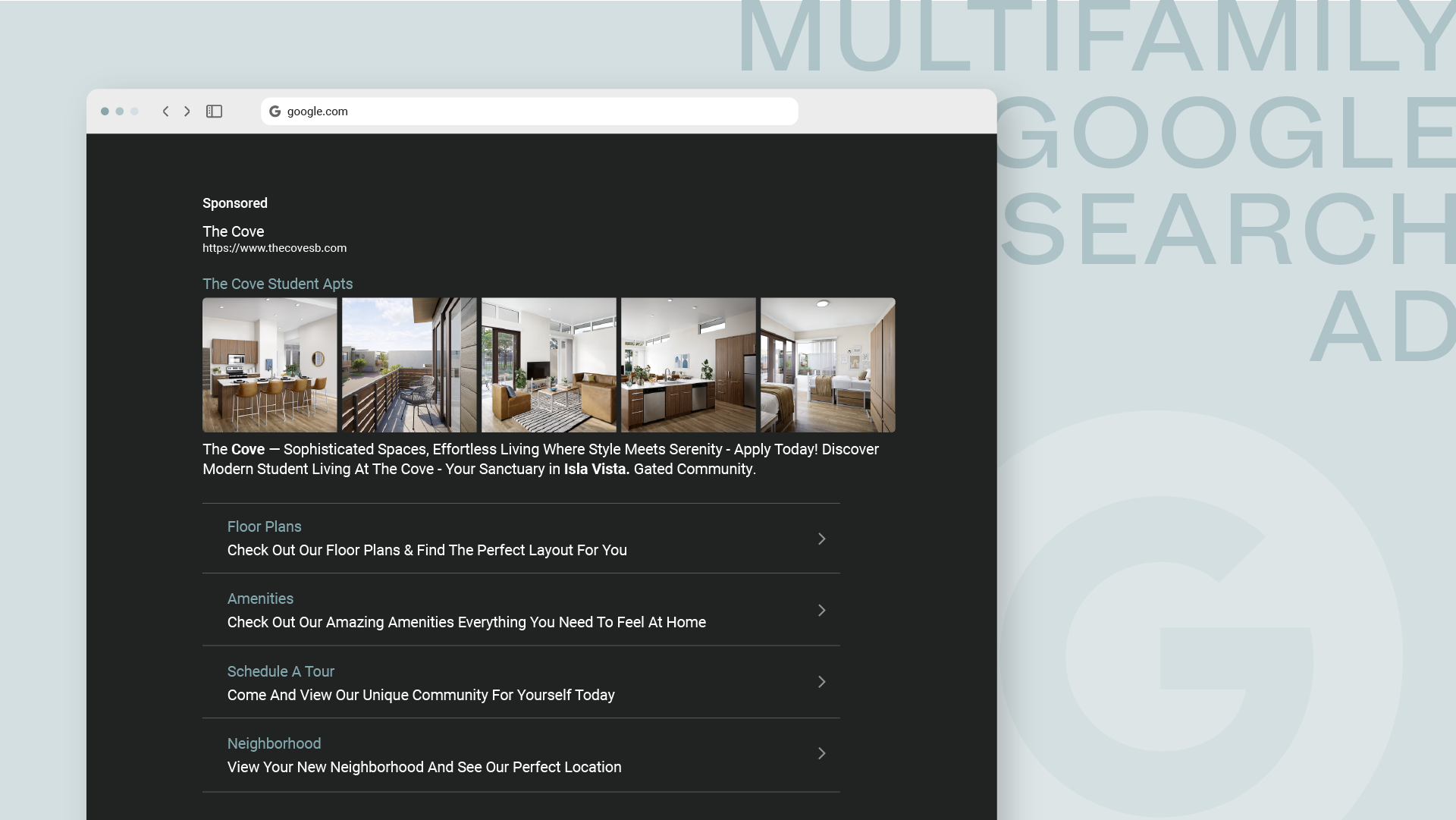
These ads appear on the main Google Search results page, but also on Google Search Partner sites and directly on Google Maps as promoted pins.
To make them even more effective, we recommend using Ad Extensions. These are extra snippets of information that expand your ad’s size and provide more reasons to click. Key extensions for multifamily include:
- Sitelink Extensions: Direct links to specific pages like “Floor Plans” or “Contact Us.”
- Callout Extensions: Short, non-clickable highlights like “Pet-Friendly” or “Fitness Center.”
- Structured Snippet Extensions: Lists of features under a specific header, such as “Amenities” (e.g., “Pool,” “Gym”).
- Call Extensions: A clickable phone number for mobile users.
- Location Extensions: Your address and a map to help users find you.
- Image Extensions: A relevant, high-quality image to make your ad stand out.
- Price Extensions: A list of floor plans with starting prices.
Google Display Ads
Display Ads are visual ads—image banners, graphics, or videos—that appear across the Google Display Network, a collection of over 3 million websites, apps, and Google properties like YouTube and Gmail.
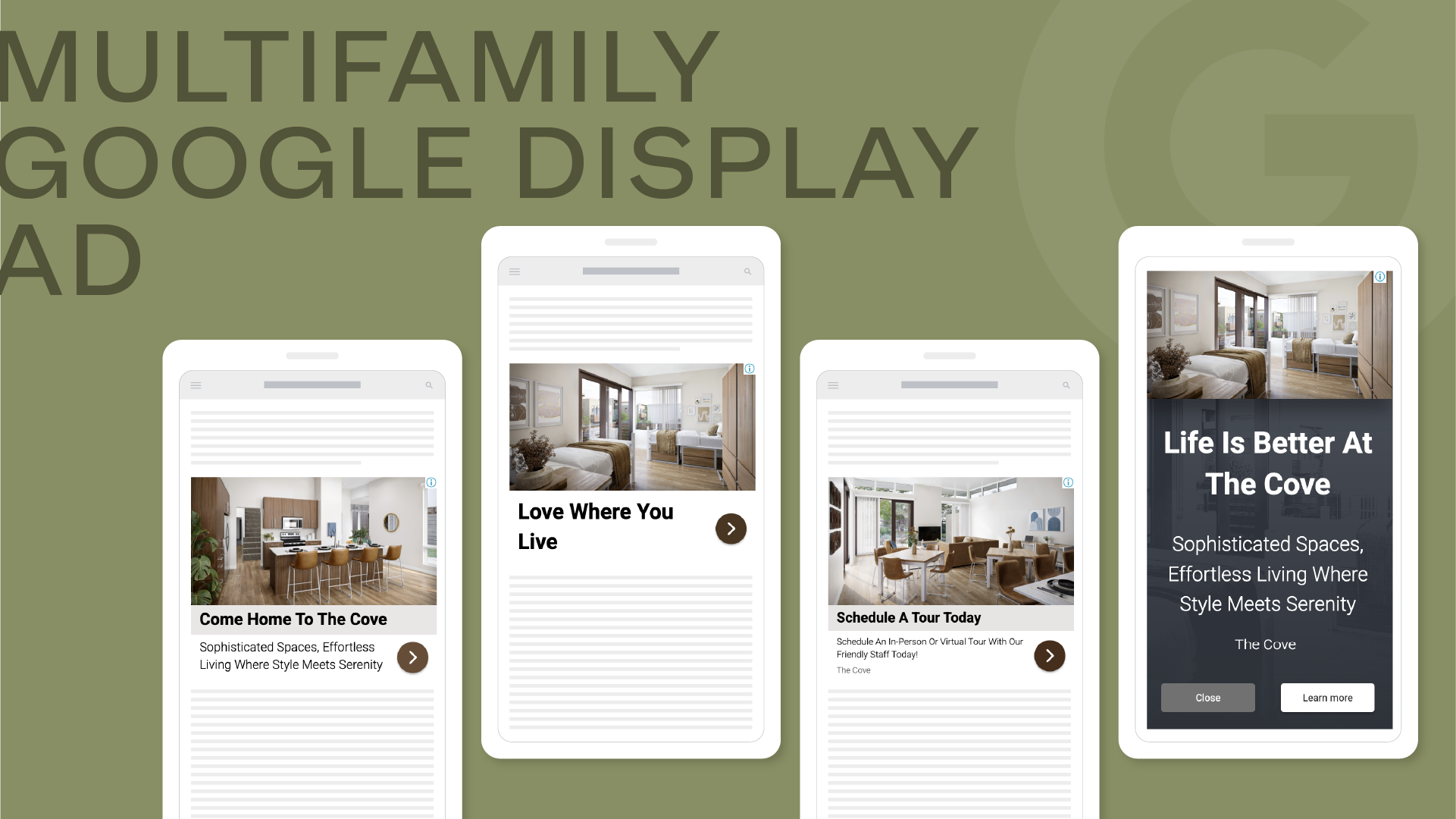
Unlike Search Ads, which capture intent, Display Ads generate awareness. They target users at the top of the funnel to introduce your brand and keep it top-of-mind. The goal here is impressions and visibility, not direct conversions. These ads are served based on audience targeting, not keywords. Google’s system then assembles the best combination of your provided images, headlines, and descriptions to fit the ad space. All you need are high-quality photos of your community; our team handles the rest.
Create ad groups
Within a campaign, keywords and ads are organized into ad groups. Think of them as tightly themed sub-folders. For example, a “Two-Bedroom Apartments” ad group would contain keywords like “2 bed 2 bath apartments” and ads with copy that speaks directly to that need.
This structure is critical for relevance. By grouping similar keywords, we can write highly specific ad copy that matches the user’s search query. This relevance is rewarded by Google with a higher Quality Score, which leads to better ad positions and lower costs.
Typical ad groups for a multifamily campaign are based on:
- Specific amenities
- Floor plan types
- Competitor property names
- Hyper-local locations (neighborhoods, nearby landmarks)
Budget is allocated at the campaign level, not the ad group level. Spend within ad groups is determined by user search volume.
Write compelling copy
Your ad copy is your digital handshake. Due to strict character limits (30 for headlines, 90 for descriptions) it must be clear, concise, and compelling. A responsive search ad can have up to 15 headlines and 4 descriptions, and Google’s AI will automatically test combinations to find the highest-performing variations.
This is why having a variety of headlines and descriptions is so important. By highlighting different aspects of the community—floor plans, amenities, location, special offers—we give Google the assets it needs to serve the most relevant ad for any given search query. Descriptions should also include a strong call to action, like “Schedule a Tour Today!” or “Apply Online Now,” and can be used to create urgency by mentioning “Limited Availability.”
Ad copy should be reviewed monthly. If a headline or description is underperforming, it gets updated. However, changing copy too frequently can reset the ad’s learning phase and cause performance fluctuations.
Set targeting options
Getting your ad in front of the right person at the right time comes down to targeting. The most effective targeting levers for multifamily PPC are:
- Geographic Targeting: Specify the exact regions where ads should appear, from a city down to a specific radius around a major employer or university.
- Keyword Targeting: Hand-select the keywords that align with what your ideal residents are searching for.
- Audience Retargeting with GA4: Track user behavior on your website and create custom audiences in Google Ads. This allows us to re-engage users who visited your site but didn’t convert, or even target current residents who visit the resident portal with renewal reminders.
Choose keyword match types
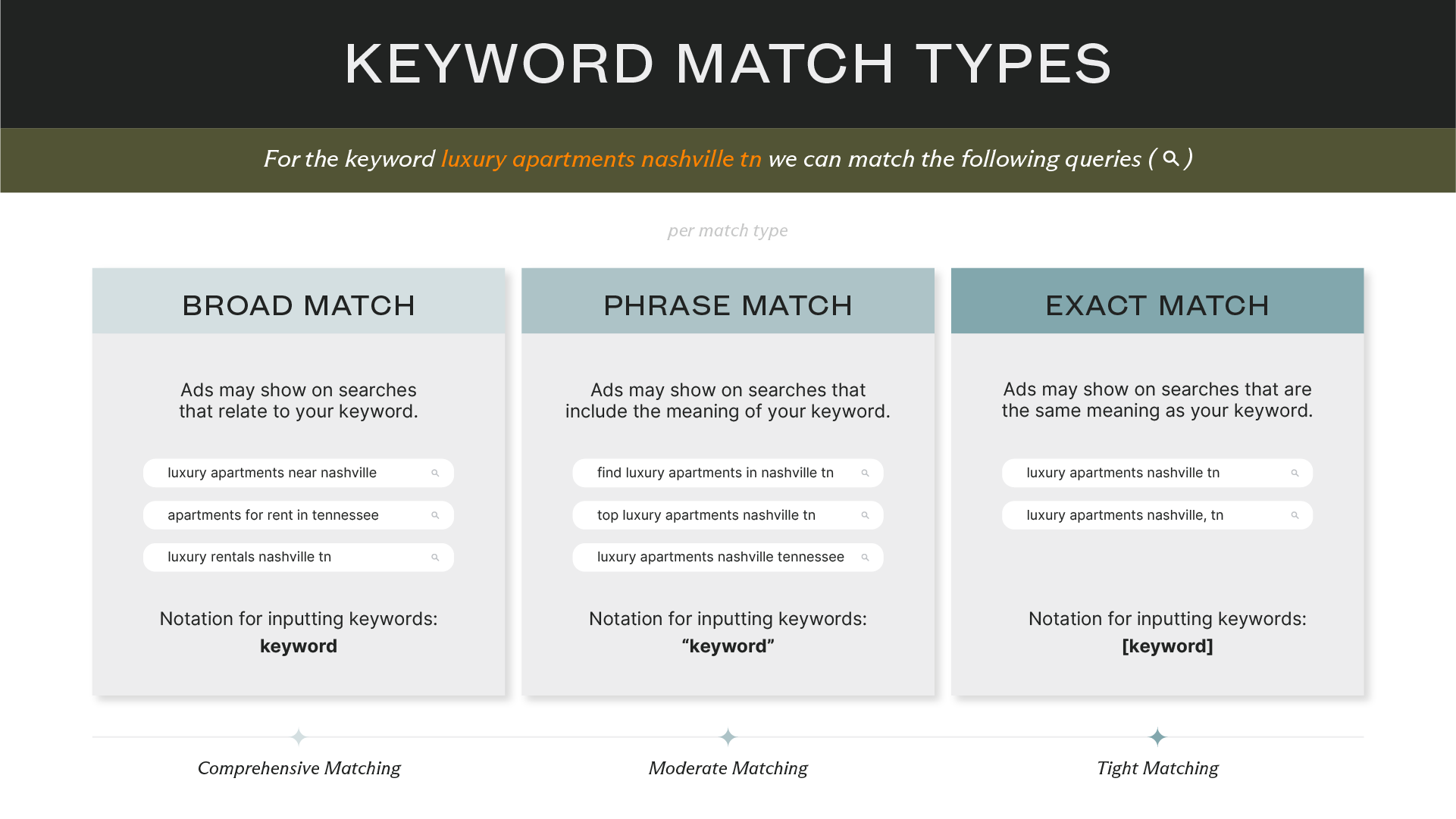
Keyword match types control how closely a user’s search query must match your keyword to trigger your ad. There are three main types:
- Broad Match: Casts the widest net, showing your ad for searches related to your keyword. It maximizes reach but can lead to irrelevant clicks.
- Phrase Match: Your ad shows for searches that include the meaning of your keyword. It offers a balance of reach and control.
- Exact Match: The most restrictive type, showing your ad only for searches with the same meaning or intent as your keyword. It delivers high relevance but limits reach.
We recommend using Phrase Match and Exact Match keywords. This combination allows us to capture the most relevant traffic while ensuring we don’t waste ad spend on irrelevant search queries. Avoid Broad Match because, historically, it triggers ads for queries that are far too general or unrelated to what a community offers, resulting in wasted spend and a poor user experience.
Select bidding strategy
A bid strategy tells Google how to bid for you in the ad auction. These strategies fall into two main categories: manual and automated.
- Manual Bidding: You set the maximum cost-per-click (CPC) for each keyword. It offers total control but is extremely time-consuming.
- Automated & Smart Bidding: You let Google’s machine learning algorithms adjust your bids in real-time to optimize for a specific goal. Smart Bidding leverages a massive range of signals—device, location, time of day, user behavior—to predict the likelihood of a conversion.
To get the most out of your bid strategy, our team recommends using two Smart Bidding strategies:
- Maximize Clicks: Aims to get the most clicks possible within your budget. This is excellent for new campaigns that need to gather data and drive traffic volume.
- Maximize Conversions: Aims to get the most conversions possible within your budget. This is ideal for established campaigns focused on generating leads.
Using a combination of these two strategies ensures campaigns generate a healthy volume of both traffic and conversions.
Set up tracking for key metrics
Remember those goals we defined back in the planning stage? Now it’s time to set up the tracking to measure them. To track leads like contact forms, tour requests, and applications, you need to set up custom conversion events using a combination of Google Analytics 4 (GA4), Google Tag Manager, Google Ads, and call tracking software like CallRail.
The basic workflow looks like this:
- A user action on the website (e.g., submitting a form) is captured as a custom event in GA4, often set up via Google Tag Manager.
- This event is marked as a Key Event in GA4.
- Your GA4 and Google Ads accounts are linked.
- The Key Event is imported into Google Ads as a Primary Conversion.
It’s also critical to ensure that traffic from your apartment PPC campaign is being attributed correctly in your Property Management System (PMS), like Entrata or Yardi. Your PMS provider will supply custom URL tracking parameters that your Google Ads partner can add to your campaigns. This tells your PMS where the lead came from, so when a prospect schedules a tour after clicking a Google Ad, your system attributes it correctly.
Launch your campaign
This is the moment of truth. Before hitting the launch button, a final review of all campaign settings—budget, targeting, bidding, ad copy, landing page links—is essential. Once live, the campaign enters the “learning phase.”
The learning phase is the period when Google’s algorithm gathers the data it needs to learn how to best deliver your ads. While it can be as short as two weeks, a typical learning phase lasts 4-6 weeks. The exact duration depends on traffic volume; the system needs enough data to generate meaningful metrics before it can fully optimize performance.
Performance can fluctuate during this time as the system tests and learns. It is critical to avoid making major changes to the budget, bidding strategy, or targeting during this phase, as it will reset the process. Patience is key.
Occasionally, ads get disapproved for violating Google’s policies, such as using misleading content or having landing page issues. When this happens, quickly identify the cause, make the necessary updates, and resubmit the ad. Sometimes, an ad is flagged by mistake; in these cases it is important to appeal the decision, which typically resolves the issue within 24 hours.
3. Monitoring, optimization, and ongoing management
PPC is never “set it and forget it.” Continuous monitoring, optimization, and management are required to maximize your return on investment. By closely tracking metrics and making data-driven adjustments, you refine campaigns to achieve better results and ensure every dollar is spent effectively.
- It Gives a False Picture: Google personalizes search results. What you see is not what a typical prospect sees.
- It Lowers Your Click-Through Rate (CTR): When your ad is shown but not clicked, you’re telling Google it’s not relevant. This can lower your Quality Score, leading to higher costs and less frequent ad delivery.
- It Costs You Money: If you do click your own ad, you pay for it—a click that will never turn into a lease.
Identify negative keywords
Negative keywords are terms that prevent your ad from showing for certain searches. For example, if your community isn’t pet-friendly, you would add “pet-friendly” as a negative keyword. This prevents you from wasting money on clicks from users who would never convert.
Our team routinely reviews the search terms that triggered our clients’ ads. When we find an irrelevant term, we add it to our negative keyword list to prevent the ad from showing for that query again. This is an ongoing process, as searchers are constantly using new and different phrasing. It’s important to remember that a single negative keyword doesn’t exclude all related terms. Adding “senior” as a negative keyword won’t block searches for “55+,” “assisted living,” or “retirement homes.”
Adjust bids
In Google Ads, “pacing” refers to the rate at which your budget is spent throughout the month. Good pacing ensures your budget lasts the entire period, rather than running out early. We use specialized tools to monitor pacing. If a campaign is under-pacing, it could indicate low search volume. If it’s over-pacing, it may mean there’s an opportunity to capture more traffic by increasing the budget.
Optimize quality score
Google’s Quality Score is a rating from 1 to 10 that estimates the quality of your ads, keywords, and landing pages. A higher Quality Score leads to lower costs and better ad positions. It’s Google’s way of rewarding advertisers who provide a great user experience.
The main factors that contribute to Quality Score are:
- Expected Click-Through Rate (CTR): How likely users are to click your ad.
- Ad Relevance: How well your ad copy matches the user’s search query.
- Landing Page Experience: How relevant and user-friendly your website is. This includes mobile-friendliness and fast page-load speeds.
Ultimately, Google wants to provide the most relevant results to its users. If your website is optimized, loads quickly, and provides the information a user is looking for, Google will reward you with a higher Quality Score, and you won’t have to bid as much to secure a top ad spot.
Stay up to date on Google Ads news
The world of Google Ads is constantly changing. Google regularly introduces new features, AI-powered tools, and advanced ad formats. Staying on top of these updates is crucial for maintaining high-performing campaigns and gaining a competitive edge.
For the latest in PPC news and trends, we recommend checking out the Paid Media section of Search Engine Journal.
Other types of paid media campaigns
While Google Ads is a powerhouse, it’s just one piece of the paid media puzzle. To build a truly comprehensive strategy, other channels should be considered.
- Geofencing: This is a location-based strategy where we create a virtual boundary around a specific location, like a competitor’s leasing office or a major local employer. When a user enters this “geofence” with their mobile device, it triggers a targeted display ad. Geofencing is a top-of-funnel tactic used to drive brand awareness and track foot traffic to your community.
- Connected TV (CTV): CTV ads are served on streaming services and smart TVs. We can deliver a 30-second video ad directly to viewers in their living rooms, complete with a QR code they can scan to visit your website. Like geofencing, CTV is a powerful top-of-funnel tool for building brand awareness.
- Paid Social (Meta Ads): This involves running targeted ads on platforms like Facebook and Instagram. We can use a variety of engaging ad formats—carousels, videos, slideshows—and place them in feeds, Stories, and Reels. Paid Social lives in the middle of the funnel, driving awareness and consideration while also using retargeting to capture leads directly within the platform.
Lead your market with a data-driven PPC strategy
Navigating the complexities of apartment PPC requires more than just a budget; it demands deep expertise, constant vigilance, and a data-driven strategy. From meticulous keyword research and compelling ad copy to precise tracking and continuous optimization, every element must work in concert to turn searchers into residents.
This isn’t a task to be taken lightly. It’s a full-time job that requires a team of specialists dedicated to mastering the ever-changing landscape of Google Ads. You need a partner who understands the nuances of the multifamily industry and has the proprietary data to back up their strategies.
If you’re ready to stop competing for clicks and start winning leases, let’s talk.

Sign up for our newsletter.
Stay in the know about our insights and industry trends.
