



Meta (Facebook) Ads For Apartments: How To Launch A Successful Strategy


Table of Contents
If you aren’t capitalizing on a Facebook ad strategy for your apartment community, you are missing out on crucial, targeted brand visibility. Paid social advertising through Meta (Facebook) for your apartment is one of the best strategies to improve your community’s brand awareness at a low cost.
With fine-grain targeting options and conversion action integrations, Meta’s advertising platform gives you the tools you need to put your community in front of the right audience at the right time.
This is your guide to the strategy and setup of Meta Ads. We’ll provide actionable, multifamily-specific tips to ensure your campaigns perform to their fullest potential, turning passive scrollers into active leads.
Key Takeaways
- Meta ads are a powerful tool for boosting brand awareness. Across the Agency FIFTY3 portfolio, we see an average Cost Per 1,000 Impressions (CPM) of just $12.46.
- Combine the Meta Pixel with Lead Form ads to create a powerful retargeting machine that drives high-intent conversions from users who have already shown interest in your community.
- Meta’s algorithm is smart. It automatically optimizes ad delivery for the times of day and week when your audience is most active, so you don’t have to guess.
- Video content is king. Short, authentic videos like virtual tours and resident testimonials consistently deliver strong engagement and results.
Prepare to Launch Your Apartments Meta Ads
Let’s get your Meta apartment rental ads off to a strong start. This initial setup lays the digital foundation for a successful campaign. Getting these core pieces right from the beginning saves you headaches down the road and empowers your team to work efficiently.
Create a Business Manager Account
If you manage multiple apartment communities, work with a marketing team, or plan to scale your Facebook and Instagram ad efforts, Meta Business Manager is non-negotiable. It’s the tool that organizes and controls access to all your properties’ ad accounts and pages.
- Centralized Property Management: Manage Facebook Pages and ad accounts for your entire portfolio from a single, clean dashboard.
- Enhanced Team Collaboration: Grant specific access levels (admin, advertiser, analyst) to marketing team members, regional managers, and on-site staff. This controls who can view, edit, or manage ad campaigns, preventing unauthorized changes.
- Improved Security: Business Manager separates your personal Facebook profile from your business activities. It also allows for the implementation of Two-Factor Authentication, significantly reducing the risk of unauthorized account access.
- Pixel and Catalog Management: Create and manage all of your Meta Pixels from one place. We’ll cover why this is so important in a moment.
- Instagram Integration: Seamlessly connect your Instagram business accounts to your ad accounts for true cross-platform advertising.
- Portfolio-Wide Reporting: Access customized reporting across multiple ad accounts at once, allowing you to measure performance and see how communities compare across your entire portfolio in one view.
Set Up Your Ad Account
With your Business Manager in place, the next crucial step is establishing your ad account. This is where your campaigns will live, budgets will be managed, and performance will be tracked.
During the ad account creation process, you will need to:
- Name the account. We strongly recommend a standardized naming convention across your portfolio (e.g., [Property Name] – [City, ST]).
- Choose your time zone and currency. Choose carefully, this is a permanent decision.
- Add a payment method. Your ads cannot run until this is in place.
Once created, you can grant access to yourself and relevant team members with permissions for Admin (full control), Advertiser (can create and manage ads), or Analyst (can view ad performance).
Create & Install the Meta Pixel
Think of the Meta Pixel as a digital “clerk” that you place on your website. It’s a small snippet of code that anonymously tracks visitors and the actions they take, giving you the data needed to measure the true effectiveness of your ads. You can create your Pixel from the Events Manager section of your Business Manager.

The Meta Pixel will enable enhanced capabilities including:
- Website Traffic Tracking: See who is visiting your apartment website from your ads.
- Conversion Tracking: Measure the success of your ads by tracking high-value actions like tour requests, floor plan views, and contact form submissions.
- Powerful Retargeting: Show hyper-relevant ads to people who have already visited your site, dramatically increasing the chances of conversion.
- Audience Building: Create Custom Audiences based on specific website visitor behavior. Here are a few common audiences we build for our clients:
-
- All website visitors from the last 30, 60, or 90 days
- Users who viewed specific floor plan pages
- Users who engaged with social lead forms
- People who have engaged with your Facebook Page or Instagram Profile
- Smarter Ad Delivery: Meta’s algorithm uses Pixel data to optimize your ad delivery, showing your ads to people who are most likely to take the actions you care about.
Once you have generated your pixel, you will need to have it installed on your community website by your web developer or marketing partner.
Connect Your Instagram Account
To truly maximize your apartment advertising potential, you need to leverage the combined power of Facebook and Instagram. While your ads can run on Instagram without connecting an account, doing so gives you far more control and, most importantly, credibility.
An ad from an unconnected account simply pulls your Facebook Page name and profile picture. There’s no profile to click on, and you cannot engage with users who comment on your ad.
When you connect your Instagram account:
- Your ads show as coming from your actual Instagram profile, allowing users to click through and discover your community.
- You can reply to comments and manage your Instagram DMs, fostering engagement and answering prospect questions directly.
- You can create user engagement audiences specific to your Instagram activity, further refining your retargeting efforts.
Define Your Audience With Meta Targeting
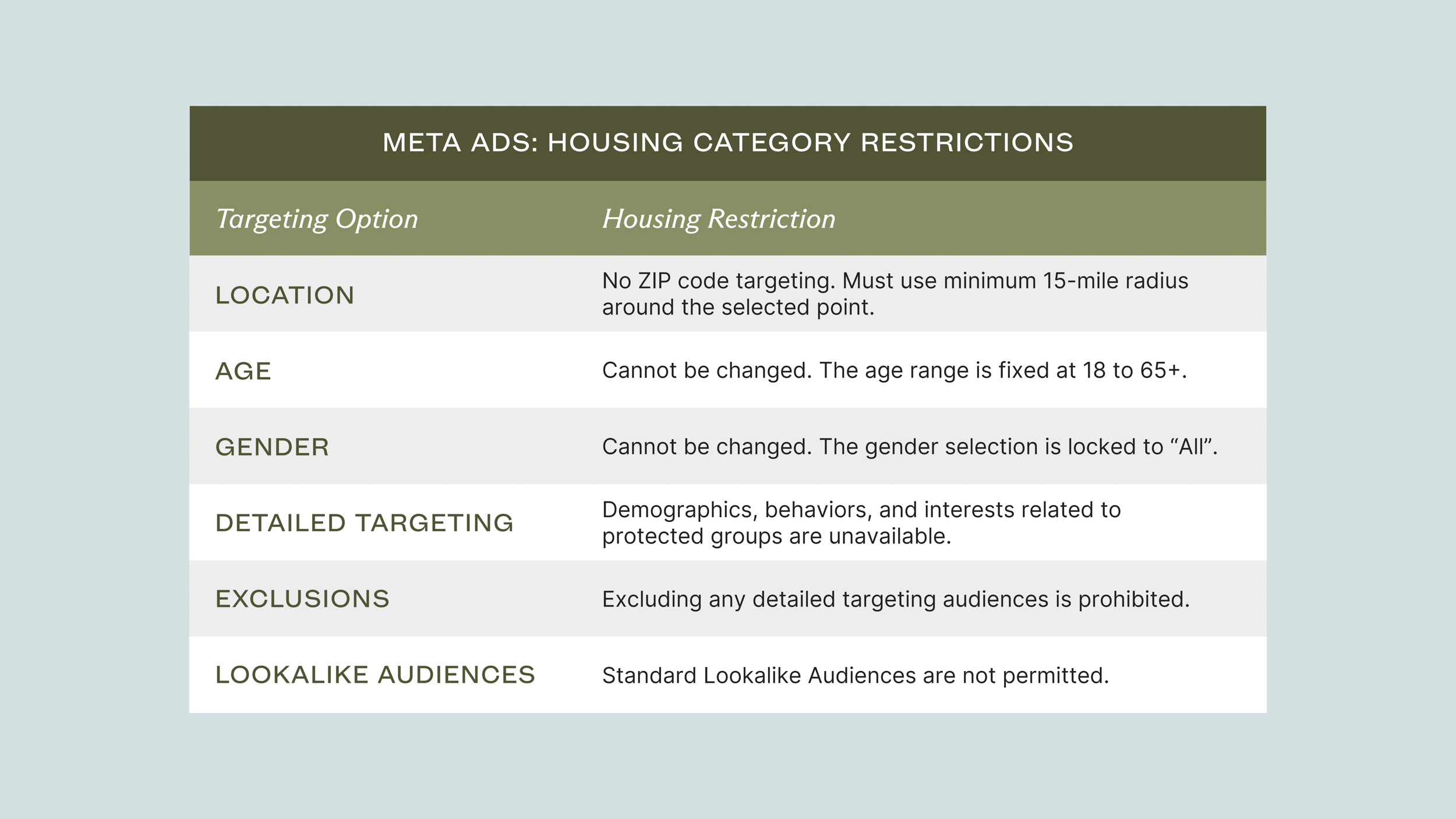
This is where strategy really comes into play. Advertising for housing opportunities on Meta requires you to operate within the “Housing” Special Ad Category. This is a non-negotiable policy Meta enforces to prevent discrimination based on protected characteristics. While this limits some traditional targeting options, it doesn’t prevent us from reaching the right renters. It just requires a smarter approach.
Geographic Targeting
While you can’t target by ZIP code, you can still target effectively by location. The “Housing” category requires a minimum 15-mile radius around any specific point you select. This allows you to build a geographic net around key locations, such as:
- Your apartment community’s address
- A major university or employer
- Nearby or competing cities
Interests & Behaviors
This is your most powerful tool within the Special Ad Category. Meta determines user interests based on a massive number of data points, including the pages they like, the content they engage with, and their activity on other websites that have the Meta Pixel installed.
For multifamily, we’ve found that targeting users with the following interests is highly effective:
- Apartments.com
- Apartment Guide
- Apartment List
- Renting
- Rent.com
- Zillow
- Trulia
- Property Finder
Behavioral targeting, such as “people who are likely to move,” is restricted under the housing category. The focus remains on expressed interests.
Custom Audiences
Custom Audiences are your secret weapon for dialing in your marketing efforts. These are audiences you create based on your own data, allowing for precise and effective retargeting. In our campaigns, we heavily utilize Custom Audiences to:
- Retarget High-Intent Users: We serve ads to audiences of previous website visitors and users who have engaged with our social media content. These warm leads are often the most likely to convert.
- Exclude Current Residents: We can exclude followers of your social media pages or upload a list of current residents to ensure you aren’t wasting ad spend on people who have already signed a lease.
- Target Prospect Lists: You can upload lists of contacts (e.g., from a housing fair or university partnership) to display ads directly to people you know are prime candidates.
Create Compelling Ads
Your ad creative is the digital curb appeal for your community. But in a crowded social feed, a pretty picture isn’t enough. Your visuals and copy must work together to create a powerful, on-brand first impression that not only stops the scroll but also builds instant recognition and trust. This section will guide you through crafting visuals and copy that are not just high-quality, but strategically aligned with your brand to drive both visibility and conversions.
High-Quality Visuals
There is no substitute for authentic, professional assets that accurately reflect your brand. Your photos and videos must do more than just showcase amenities; they must tell your community’s unique story and create a consistent brand experience at every touchpoint, from the ad to your website.
- Invest in professional photography and videography that captures your brand’s aesthetic: Capture bright, high-resolution images that highlight the unique features of your property, from amenities like the fitness center and pool to in-unit details.
- Think like a resident and showcase your brand promises: Use wide-angle lenses to convey spaciousness and use images that resonate with your target audience (e.g., students in a study lounge, young professionals in the business center). Lifestyle photography that shows people enjoying the spaces is especially powerful.
- Video is a must: Short, authentic video content continues to deliver outstanding performance on Meta.
-
- Virtual Tours: Aim for about one minute, highlighting key features and amenities.
- Testimonial Videos: These can be shot on a modern smartphone. Keep them vertical (for Stories/Reels) and under 30 seconds for maximum impact.
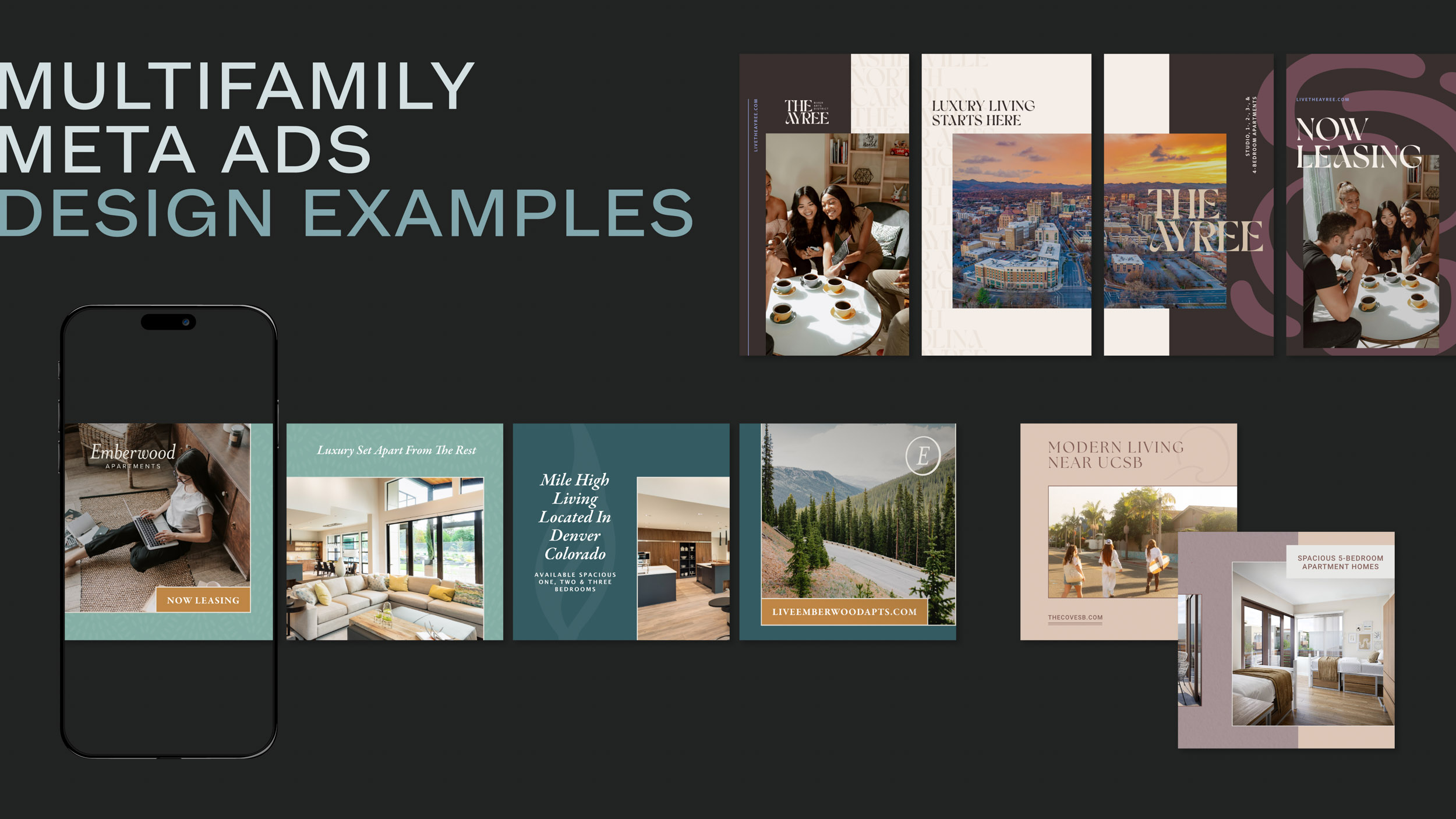
What if you don’t have a deep library of on-brand assets? This is a common challenge, and it’s where many social ad strategies miss the mark. Our team specializes in creating compelling, on-brand creative deliverables that make your property stand out. We develop branded graphics that ensure every ad is a perfect representation of your community, turning your existing photos into a powerful marketing tool.
Engaging Ad Copy
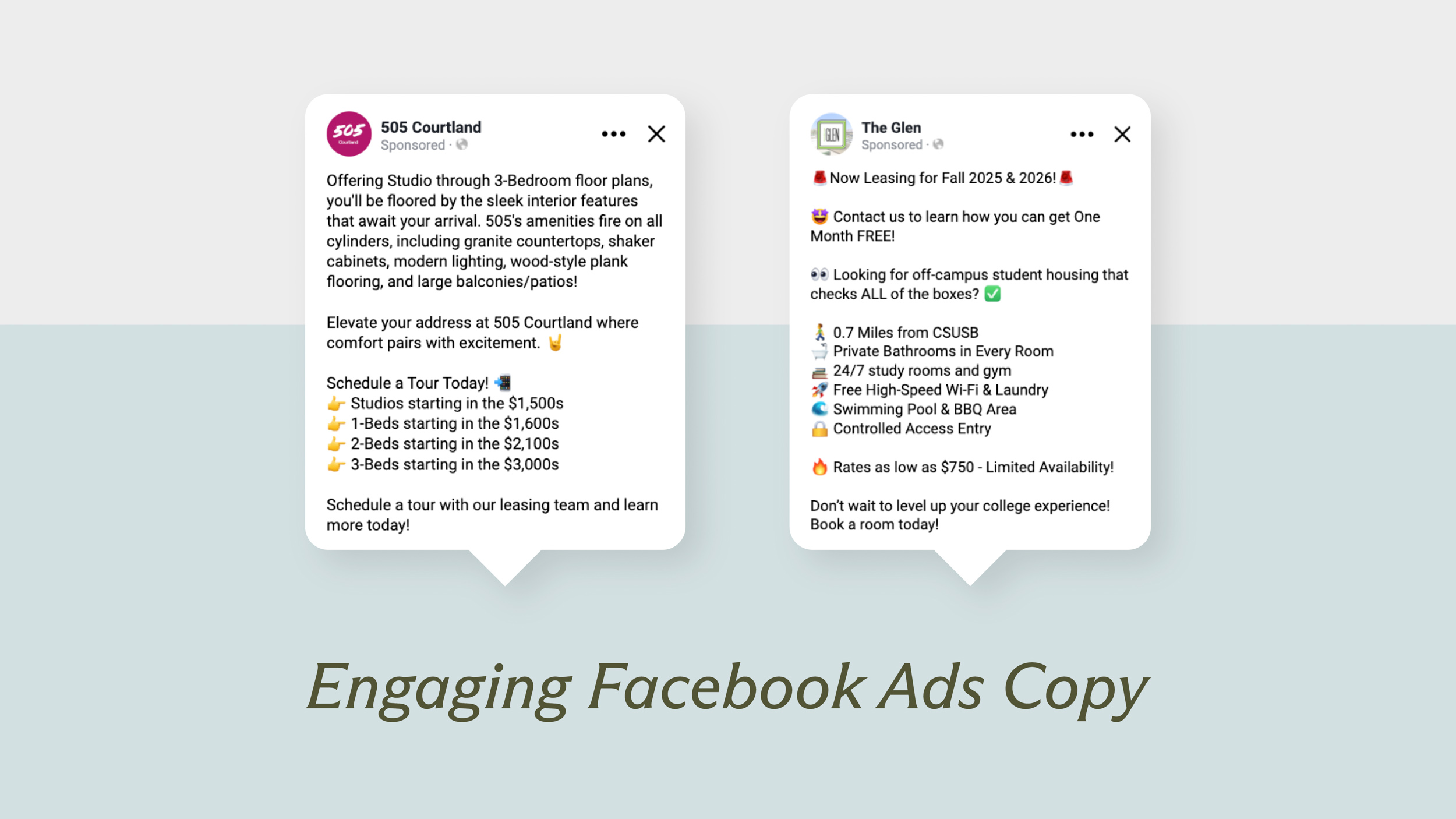
Your copy must work in tandem with your visuals to tell a compelling story. Great ad copy for apartments is clear, concise, and value-driven.
- Hook them immediately: Start your first line with a leasing special, a unique amenity, or a catchy tagline.
- Be clear and concise: Use bullet points or emojis to break up text and highlight key selling points. Answer the question: Why do residents love living here?
- Always include a call to action (CTA): Use direct, action-oriented language like “Schedule a Tour,” “Check Availability,” or “Apply Now.”
- Avoid large blocks of text: Keep paragraphs short and scannable, especially for mobile users.
Meta Ad Formats
Meta offers several ad formats, but a few are proven winners for the multifamily industry. Our standard approach for clients combines the following to create a robust ad experience:
- Carousel Ads: This format allows you to showcase multiple images or videos in a single, scrollable ad. It’s perfect for showing off different floor plans, a range of amenities, or a visual tour of the property. Each card can have its own unique headline.
- Slideshow Ads: We can take your best still images and turn them into a lightweight video file that flips through the photos. It’s a simple way to create motion and capture attention in the feed.
- Video Ads: When available, dedicated video ads are incorporated into the mix to leverage the high engagement rates of video content.
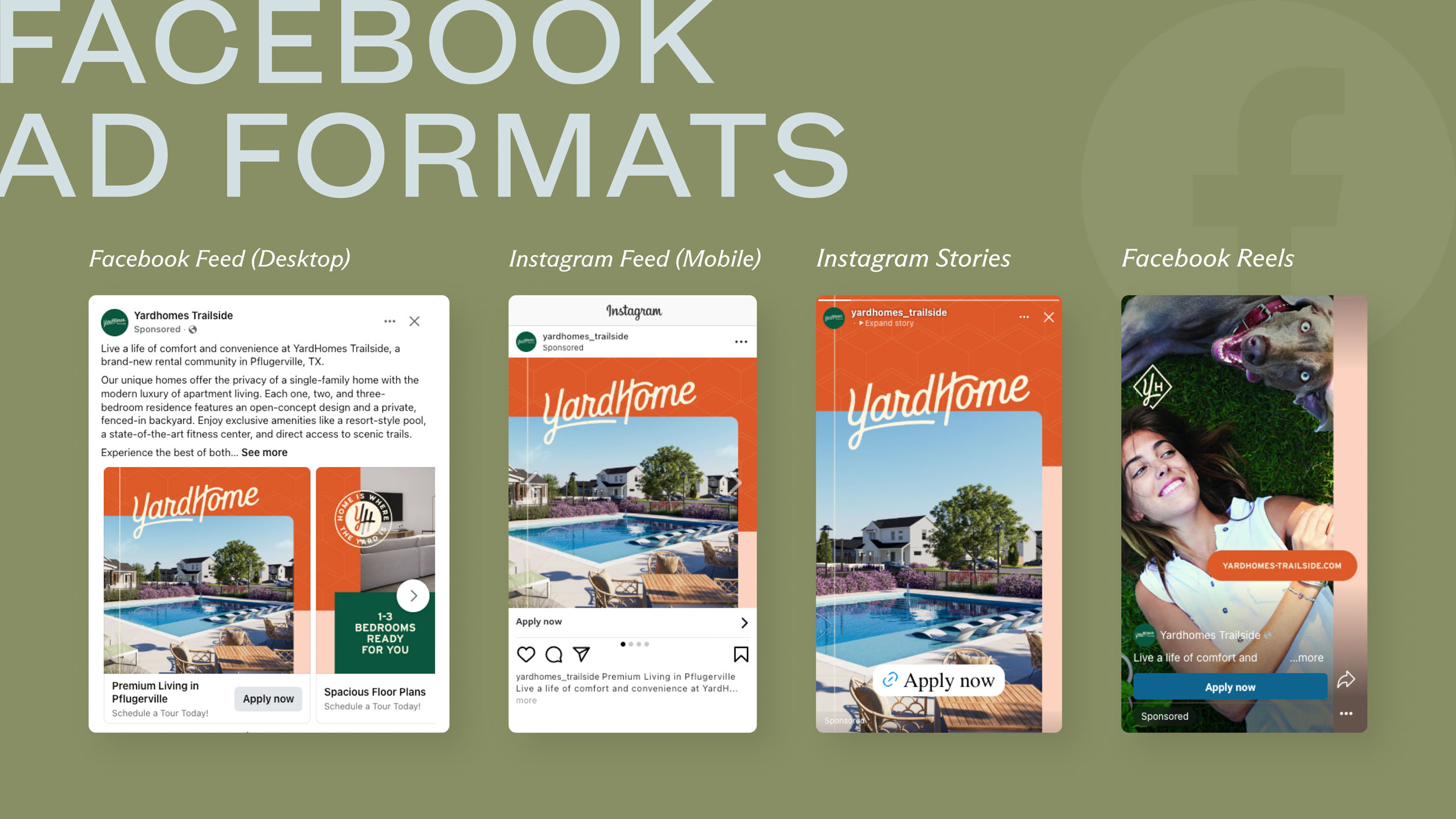
We use these same formats for all property types, from student and conventional to luxury. The strategy lies not in the format, but in tailoring the visuals and copy to the specific audience you’re trying to reach.
Optimize For Mobile Display
This is not optional. Across our entire portfolio, over 99% of social ad impressions are on mobile devices. If your ads aren’t designed for a phone screen, they are not designed for success.
- Prioritize Vertical and Square Sizing: Focus on square ads (1:1 aspect ratio) for Feeds and vertical ads (9:16 aspect ratio) for Stories and Reels. These formats maximize screen real estate as users scroll. Avoid horizontal images that get awkwardly cropped.
- Front-Load Your Message: Ad copy should be concise and lead with your hook. Avoid long, clunky paragraphs.
- Design for Thumb-Stopping: Use bold visuals, motion, or text overlays within the first two seconds to grab attention.
- Always Include Subtitles on Videos: The majority of mobile users watch videos with the sound off. Subtitles ensure your message gets through.
Set Up Campaign Objective, Budget & Placement
This is the control panel for your ads. A beautiful ad is useless if it’s not delivered to the right people with the right goal in mind. Setting up your campaign structure correctly is key to maximizing your return on investment.
Choose The Right Campaign Objective
Meta has simplified its campaign objectives into six main categories. For multifamily marketing, we’ve developed a proven strategy that primarily relies on two:
- Traffic (Prospecting): The goal of this campaign is to send new, relevant users to a destination, in this case, your community website. This is the top of your funnel, where you are introducing your property to potential renters and building an audience of interested prospects via your Meta Pixel.
- Leads (Retargeting): The goal of this campaign is to collect leads for your business. We use this objective to follow up with users who have already shown interest by engaging with an ad or visiting your website. The end goal is to serve them a Lead Form (an instant, in-app form) to capture their contact information for your leasing team.
This two-part approach creates a full-funnel strategy that first identifies prospects and then efficiently converts them into measurable leads.
Set Your Budget and Schedule
You have two main budget options: Daily or Lifetime. For ongoing campaigns, we recommend exclusively using Daily Budgets. This allows our campaigns to consistently run, learn, and optimize over time without a hard stop date.
Our Paid Media team suggests splitting the total monthly budget between these two campaigns.
- Our average monthly budget split is approximately 60% to the Traffic campaign and 40% to the Leads campaign.
- The Traffic campaign gets a larger share because it’s prospecting to a much larger audience of new users.
- The Leads campaign is retargeting a smaller, more qualified audience, so it requires less budget to be effective.
We also recommend A/B testing your ads to find out what works best. To do this effectively:
- Test one variable at a time (e.g., test one image against another, or one headline against another).
- Split the budget evenly between the two variations.
- Give the test enough time and budget to run (we recommend at least two weeks and 100 per variation).
- Define a clear success metric (e.g., Click-Through Rate for creative tests, Cost per Lead for conversion tests).
Select the Perfect Ad Placement
Meta allows you to place ads across Facebook, Instagram, Messenger, and its Audience Network. While you can manually select where your ads appear, we recommend launching campaigns using Automatic Placements.
This allows Meta’s algorithm to deliver your ad across all placements and automatically determine where it will perform best at the lowest cost. With this in place, you can then monitor performance and manually remove any placements that are underperforming. The most important placements for multifamily are:
- Feed (Facebook & Instagram): This is the prime real estate. Carousels and short videos perform exceptionally well here. Use eye-catching visuals and a clear CTA.
- Stories & Reels (Facebook & Instagram): These full-screen, vertical placements demand motion and engagement. Use short videos (under 15-30 seconds), native-feeling content, and a strong “Tap Here” or “Swipe Up” CTA.
Create Lead Forms
Lead Forms are an incredible lead collection tool for multifamily marketers. Also known as Instant Forms, these are customizable forms that appear instantly when someone taps your ad.
- They are used for retargeting within our Leads campaigns.
- They often pre-fill with a user’s contact information (name, email, phone) from their profile, making submission incredibly easy and boosting conversion rates.
- You can add custom screening questions, like “When are you looking to move?” or “Which floor plan are you interested in?”, to provide your leasing team with more qualified leads.
- The lead’s information is emailed directly to your team in real time, allowing for immediate follow-up.
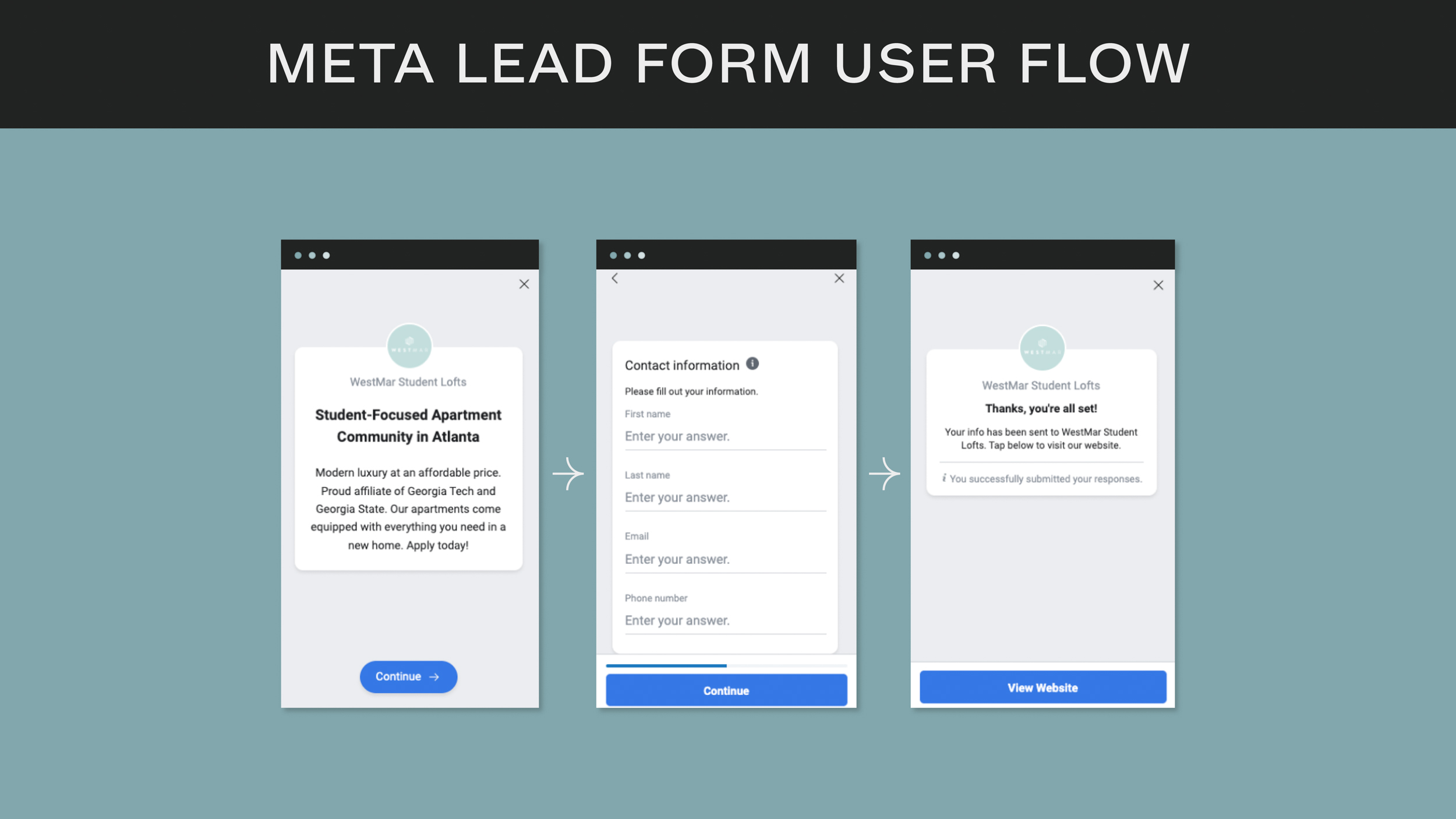
Because the user never has to leave the Facebook or Instagram app to submit their information, Lead Forms remove friction and are one of the most effective conversion tools in our arsenal.
Measure Success & KPIs
You can’t manage what you don’t measure. Tracking the right Key Performance Indicators (KPIs) is the first step to understanding campaign performance and making data-driven optimizations.
Here are the top KPIs you should be focusing on:
- Primary Metrics: Reach, Impressions, Clicks, Leads
- Efficiency Metrics: Click-Through Rate (CTR), Cost Per Click (CPC), Cost Per Conversion
- Audience Metric: Frequency (the average number of times a user saw your ad)
So which metric is the most important? It depends on the campaign’s objective.
- For ad creative, we look at Click-Through Rate (CTR). A high CTR is a strong indicator that your visuals and copy are resonating with your audience.
- For our Traffic campaign, the primary success metric is Cost per Landing Page View. This tells us how efficiently we are driving qualified traffic to the website.
- For our Leads campaign, success is measured by the number of Leads and the Cost per Lead. This is the bottom-line metric that shows the direct ROI of your ad spend.
Your Partner in Paid Social Success
Launching a successful Meta Ad strategy for your apartment community isn’t about simply boosting a post. It’s about building a strategic, full-funnel system that intelligently prospects for new renters and efficiently converts them into qualified leads for your leasing team. By pairing the right campaign objectives with compelling, mobile-first creative and a deep understanding of multifamily-specific targeting, you can turn Facebook and Instagram into a predictable and powerful leasing tool.
It requires a disciplined, data-driven approach. That’s where we come in.
Ready to build a Meta Ads strategy that delivers real, measurable results? The team at Agency FIFTY3 is here to help. Let’s chat.

Sign up for our newsletter.
Stay in the know about our insights and industry trends.
