



Multifamily Google Business Profile Optimization



Table of Contents
A Google Business Profile (GBP) is your community’s digital storefront. It is a free, customizable listing that dictates how your property appears on Google Search and Maps. For the modern renter, this profile contains your hours, location, photos, reviews, and updates. It is often the very first interaction they have with your brand.
If your listing is incomplete or inaccurate, you aren’t just looking unprofessional; you are actively turning away qualified traffic.
To separate fact from fiction, the team at Agency FIFTY3 analyzed over 200 GBPs in the multifamily industry. We looked at what actually moves the needle for attracting more potential residents and what’s just busy work.
Key takeaways:
- The website link accounts for 90% of clicks through the profile, while Google Posts generate the least interaction (0.1% of clicks).
- The website link on GBP provides the highest converting traffic of any digital medium at 7.5%.
- Listings with a keyword modifier in the GBP name (e.g. “The Monarch Apartments” vs. “The Monarch”) saw a 12% higher average web conversion rate.
- Posts do not directly impact rankings, but they signal activity to the algorithm and showcase leasing specials to your audience.
Why the Google Business Profile is your digital curb appeal
In multifamily marketing, we spend thousands ensuring the physical curb appeal of our properties looks flawless. Manicure the landscaping, clean the signage, and polish the entryways. Yet, for the modern prospective resident, the crucial “drive-by” happens online long before they ever set foot on the property.
Your GBP is no longer just a map pin; it is a key conversion point in your marketing funnel.
The zero-click search reality
The behavior of prospective residents has shifted. Years ago, a user would search for apartments, click a website link, and browse for information. Today, we live in a “zero-click” world.
Potential residents can now get directions, call the leasing office, view floor plans, read resident reviews, and check amenity lists — all without ever visiting your actual website. If your GBP is incomplete or unmanaged, you aren’t just losing traffic; you’re losing leads. Without a strong GBP, people disqualify your community based on its “digital curb appeal” alone.
To maximize occupancy, your GBP must perform two distinct roles on the Search Engine Results Page (SERP):
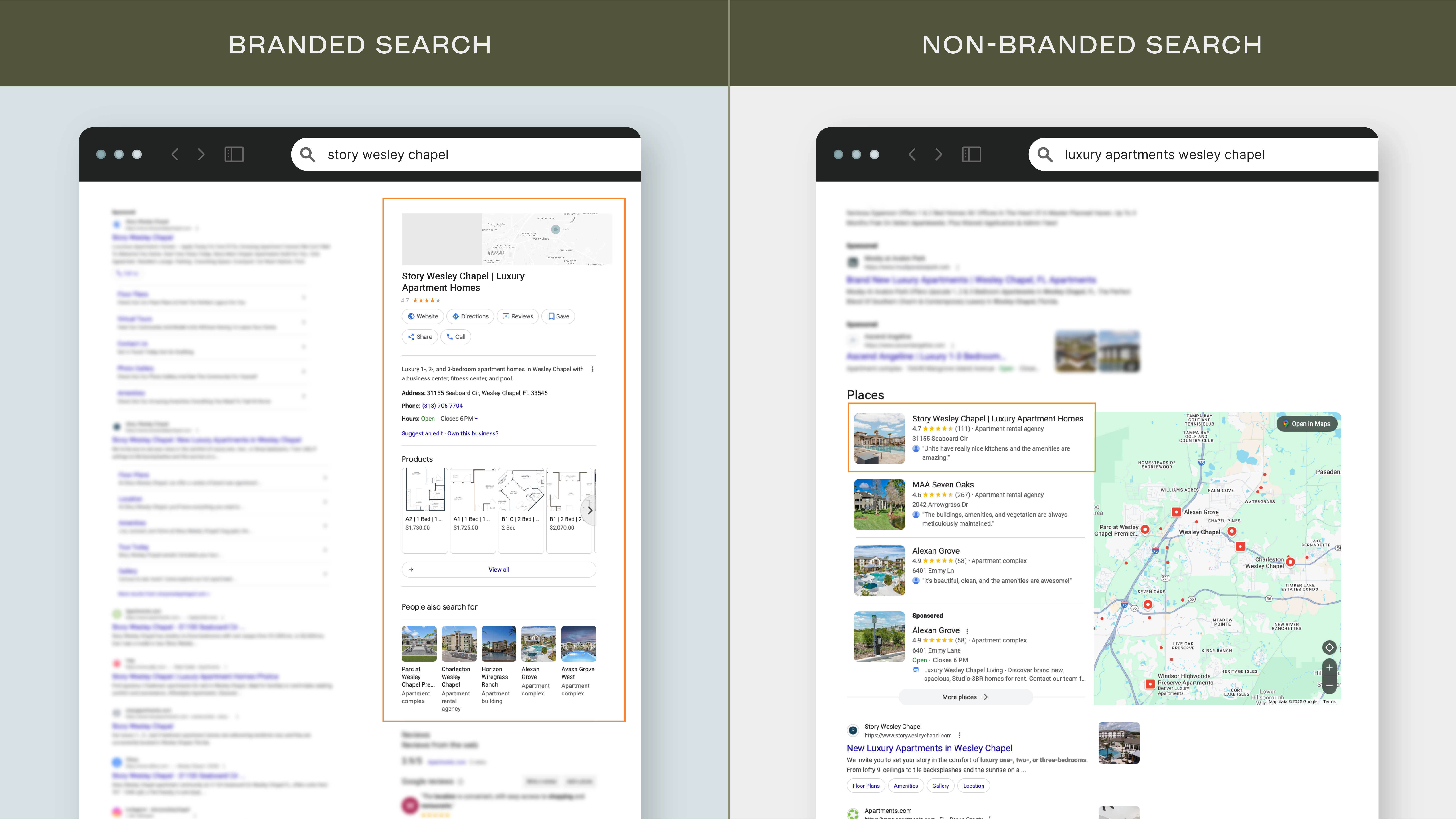
- Branded Search: When a prospect Googles your specific community name (e.g. The Enclave at State University), your GBP appears as the Knowledge Card. This is the large, detailed block on the right side of the desktop screen or the very top of mobile results. If it has many negative reviews, missing hours, or low-quality photos, you lose the trust required to get them to click or tour.
- Non-Branded Search: When a prospect searches for a category (e.g. “student apartments in Austin” or “pet-friendly apartments near me”), Google displays the Map Pack (or Local Pack). This section appears above the traditional organic website links. Notably, major ILSs such as Zillow or Apartments.com are not eligible to show in the Map pack, giving you a distinct advantage.
Future-proofing for LLMs and Google AI Overviews
The importance of GBP goes beyond traditional search. With the rise of Google AI Overviews and Large Language Models (LLMs) like ChatGPT or Gemini, search is becoming conversational.
When a user asks Google Gemini, “Find me an apartment in Denver that has a 24-hour gym and is open on Sundays,” the AI doesn’t just “read” your website. Many tools like ChatGPT can scrape Google SERP and pull data directly from your GBP fields. If your amenities section doesn’t explicitly check the “Fitness Center” attribute, or your hours aren’t properly updated, your community lacks the baseline information for an LLM to cite you in its answers.
How to pass Google’s Video Verification on the first try
Before we can discuss optimization keywords or photo strategy, we have to address the gatekeeper. The days of the “postcard PIN” are largely over. To combat spam, Google now defaults to Video Verification for multifamily and student housing listings.
The process requires a physical human onsite, recording live video. Your onsite teams, from Community Managers to Leasing Consultants, have to understand exactly how to execute this.
The risks of “unverified” status
A listing that isn’t verified isn’t working for you. However, the symptoms differ depending on the lifecycle of the community:
- New developments: For a new lease-up or construction project, an unverified listing is effectively invisible. It will typically not appear in search results or the Map Pack until the verification process is complete. This is a critical timeline bottleneck for pre-leasing efforts.
- Existing communities: If you have an existing listing that becomes unverified, the listing will likely stay live on SERPs because it has history. However, you cannot respond to reviews, update hours for holidays, or post about your new leasing specials.
The video verification standard
The number one reason for rejection is a video that fails to prove the business is legitimate. To pass on the first try, the video needs to be one continuous take (no editing/cuts) and must capture three distinct elements:
- Proof of location: Start the video outside. Film the street sign, the building number, or the permanent monument sign on the building facade. This proves you are at the correct coordinates.
- Proof of access: Walk up to the leasing office door and physically unlock it with a key or key fob. This proves you have authorized access and aren’t just a bystander filming a building.
- Proof of operations (permanent signage): The video must include permanent interior or exterior signage. If you are a new development that is still under construction and only has temporary signage, the video verification may not be successful.
Managing transitions, duplicates, & rogue profiles
One of the biggest risks to a multifamily portfolio’s SEO health is the management transition. In the chaos of onboarding a new asset, such as switching utility accounts, staffing the office, and auditing leases, the GBP often gets mishandled.
Mishandling the handover doesn’t just cause a temporary dip in traffic; it can create duplicate listings and review fragmentation that can hurt your community’s online leasing.
GBP transition best practices
The GBP is digital real estate. It holds the reviews, the age authority, and the ranking history. When you acquire a community, your goal is to inherit that asset, not build a new one from scratch.
The most common error occurs when a marketing or operations team tries to set up the property before the previous management company has released access.
- Trigger: You input the property address into Google.
- Warning: Google flags it immediately: “This business profile already exists. Do you want to request management?”
- Mistake: Because the team doesn’t have the login yet (and wants to cross the task off their list), they select “No” or “This doesn’t match” and proceed to create a “new” profile.
You might see a dashboard and think you’ve succeeded, but you haven’t. You have just forced a second listing onto the map. Google’s algorithm will eventually catch the address conflict and flag your new profile as a “Duplicate.” You are now stuck in a loop where you still need access to the original listing to resolve the conflict, but now you have a messy duplicate to clean up.
The fix:
- Ideal scenario: Ensure “Primary Owner” transfer of the GBP is a required line item on your acquisition closing checklist. The old management company should transfer ownership to your corporate email before they exit.
- Plan B scenario: If you are locked out, use the “Claim this Business” feature on the existing map listing. This triggers a request to the current owner. If they don’t respond in 14 days, Google will allow you to verify and claim the listing. Yes, you now need to do the video verification process, but it will save a future headache when you suddenly can’t post, update hours, or add photos due to being marked as “Duplicate”.
Managing a duplicate listing
If you come across this situation, in your dashboard, you see two profiles for the same property. They have the same reviews and identical info, but they have different IDs. Google has likely marked one as “Duplicate” in red text.
The fix:
- Once you gain verification access to the original (Primary) listing and have both profiles in your account, Google will recognize the redundancy.
- You will see a message on the duplicate profile: “This location is a duplicate of [Name]. You can safely remove this profile from your account.”
- Click remove. The original stays live, and the duplicate view disappears. No reviews or data are lost.
The anatomy of a high-performing multifamily GBP
Now that we have covered common verification issues and secured ownership, we move to optimization. A high-performing GBP isn’t just “filled out.” It is strategically engineered to capture non-branded search traffic and convert that into signed leases.
Below is a breakdown of the critical fields, so you can make sure they’re properly optimized (plus, how to manage them at a portfolio level).
Business name
The GBP name is one of the hottest topics in Local SEO. The Google guidelines require the legal business name, as it is represented in branding and on-site signage.
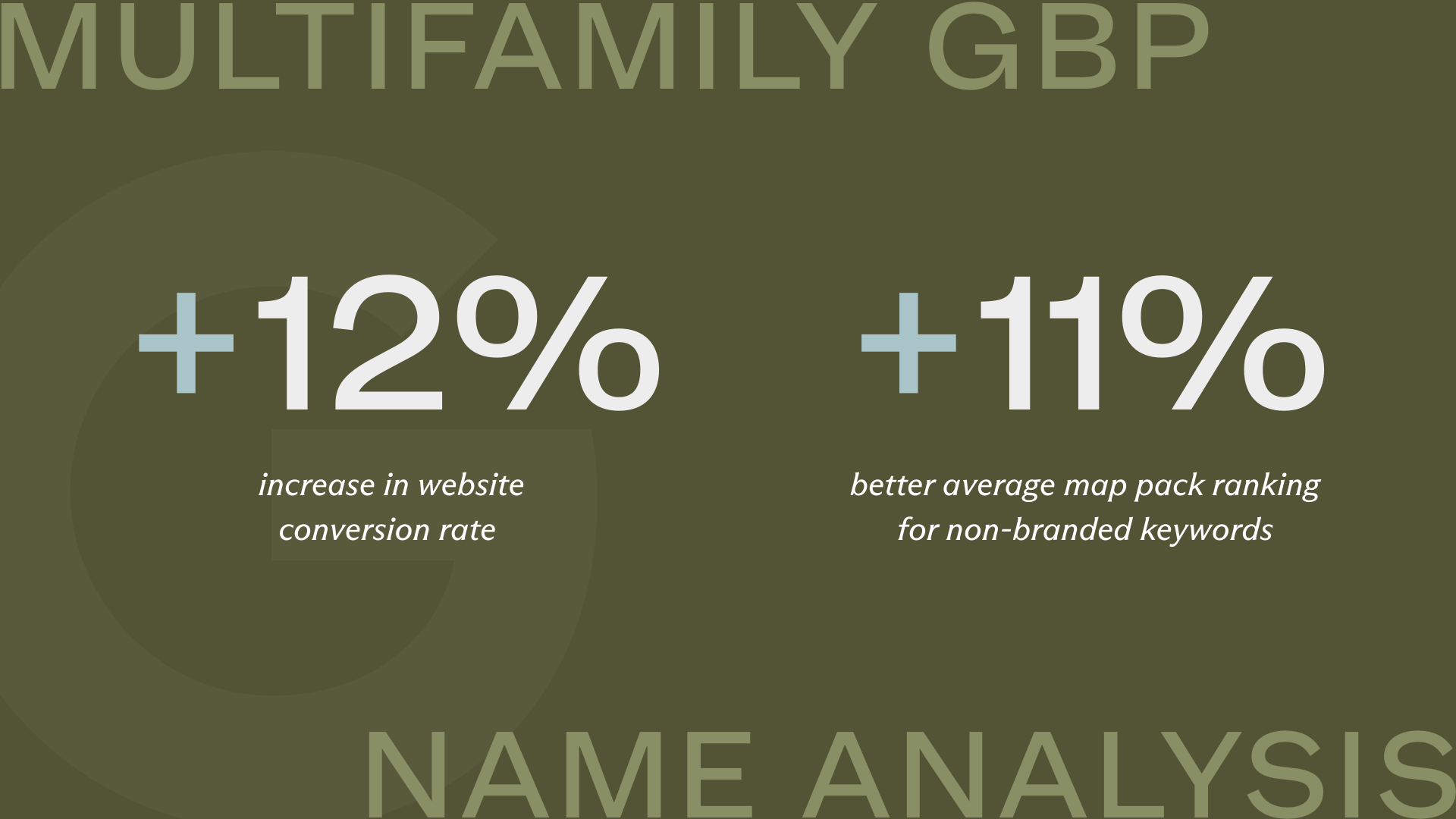
In most cases, all of your community’s top-ranking competitors are using some sort of keyword modifier in their name (e.g. “The Monarch Apartments” instead of “The Monarch”). This slight adjustment has a significant impact on local rankings for non-branded keywords, especially in highly competitive markets.
In an analysis of over 200 multifamily websites, businesses with a name modifier such as “apartments” saw a 12% increase in website conversion rates from organic traffic and an 11% better average map pack ranking for non-branded keywords compared to those without a name modifier.
A name adjustment is a calculated risk; it may be needed to compete, but keep in mind that your profile may require re-verification after a name change.
Address & pin placement
Your address format on GBP must match your website and schema markup format exactly. This consistency (NAP: Name, Address, Phone) is a foundational trust signal for Google’s algorithm.
For new developments, the map pin is often incorrect. If the pin drops in the middle of a construction zone or a dirt field, navigation apps will route prospects to blocked service roads rather than your future leasing trailer.
Primary & secondary categories
The Primary Category is your strongest SEO lever. It is the only category visible to prospective residents on your listing, acting as your public-facing label. Secondary categories, while invisible to the user, are signals used by Google’s algorithm so it can understand the full scope of your offerings and rank you for relevant searches.
- The myth of dilution: In addition to the Primary Category, you can (and should) have up to 9 secondary categories. Adding secondary categories does not dilute the power of your primary one.
- The reality of category confusion: We often see operators add “Property Management Company” to a community listing. This confuses the algorithm and reduces your visibility to your prospective residents.
| Multifamily / Student Housing Google Business Profile Category Guide | ||
|---|---|---|
| Category Name | Best Suited For | Strategic Note |
| Apartment Complex | Conventional, affordable, and luxury apartment communities. | The “Gold Standard” for general multifamily. It generally allows hours to display correctly. |
| Apartment Building | Conventional, affordable, and luxury apartment communities. | This is a high performer but has had issues for some profiles, causing the “Hours” feature to be disabled. |
| Student Housing Center | Purpose-built student housing (PBSH). | Critical for student SEO signals. Helps rank for “housing near [University]” queries. |
| Furnished Apartment Building | Communities that are furnished. | Excellent secondary category for student communities, as long as it’s accurate. |
| Townhouse Complex | Communities consisting primarily of attached townhomes. | Differentiates you from standard apartments; great for attracting families/groups. |
| Condominium Complex | Properties with condo-spec finishes or mixed ownership. | Use with caution. This is a niche category that can cause issues if not used correctly. |
Photo gallery
In the zero-click world, your photo gallery is your tour. A profile with 50+ high-quality photos will be more appealing to your prospective residents than a profile with 10 generic shots.
Do not rely solely on architectural renders, although these can be used as placeholders for communities still under construction. Google favors “real-world” photography that proves the business exists. Your GBP photos should include:
- Exterior: Day and night shots (make sure the building is well-lit).
- Interior: Model units, clubhouse, gym, and study rooms (any amenity that resonates with your target audience).
- Team: Photos of the leasing team in the office. This helps build trust with your visitors.
To ensure your visual assets are accepted by the algorithm and display correctly across all devices, adhere to these file standards:
- Format: JPG or PNG.
- Size: Between 10 KB and 5 MB.
- Resolution: Minimum 720 px tall, 720 px wide.
- Quality: Avoid heavy filters, excessive text overlays, or collages. Google’s AI often flags these as “low quality” or spam, suppressing your listing.
Make sure to upload your business logo (in 1×1 aspect ratio), especially as a “logo.” Although this doesn’t prominently show on the GBP Knowledge card anymore, it still shows up when the community owner responds to reviews on the profile.
Business hours & special hours
If a prospective resident drives to your property because Google says you are “Open,” and finds a locked door, you have created a negative brand experience before they ever tour.
The hours should be accurately listed, reflecting all the times a resident can visit your leasing office. Your listing will typically have more visibility during the listed open hours and less visibility during the hours you’re not open (especially when competitors’ leasing offices are open).
- The “Apartment Building” glitch: Be aware that the category “Apartment Building” sometimes disables the ability to add operating hours (because Google assumes the physical building structure is “open” 24/7). This is a high performing Primary Category, we recommend using it as long as the hours feature is enabled for your profile.
- Holiday & special hours: Set a calendar reminder to proactively update hours for major holidays (Thanksgiving, Christmas, July 4th). Google will often ask, “Are these hours correct for [Holiday]?” Confirming this manually signals to the algorithm that the profile is actively managed.
Description
Do not treat this field as a keyword dumping ground. Contrary to popular belief, the text in your business description has zero impact on your local ranking. Google does not crawl this section for SEO signals, so stuffing it with keywords is a wasted effort.
It is a pure conversion tool designed to hook your human readers. Use this space to highlight community value that might not fit into standard amenity checkboxes, like:
- Renovations: “Newly renovated interiors with quartz countertops.”
- Location: “Two blocks from [University] campus” or “Located in [Neighborhood].”
- Amenities: “Saltwater pool” or “yoga studio.”
Amenities & highlights
Google added the “amenities” field for apartment communities in 2025. This allows us to add more relevant information to answer prospective residents’ questions and more information for Google to understand your offerings.
Some of these amenities include:
- Basketball court
- Business center
- Fitness center
- Swimming pool
- In-unit washer/dryer
- Pets welcome
- Onsite maintenance
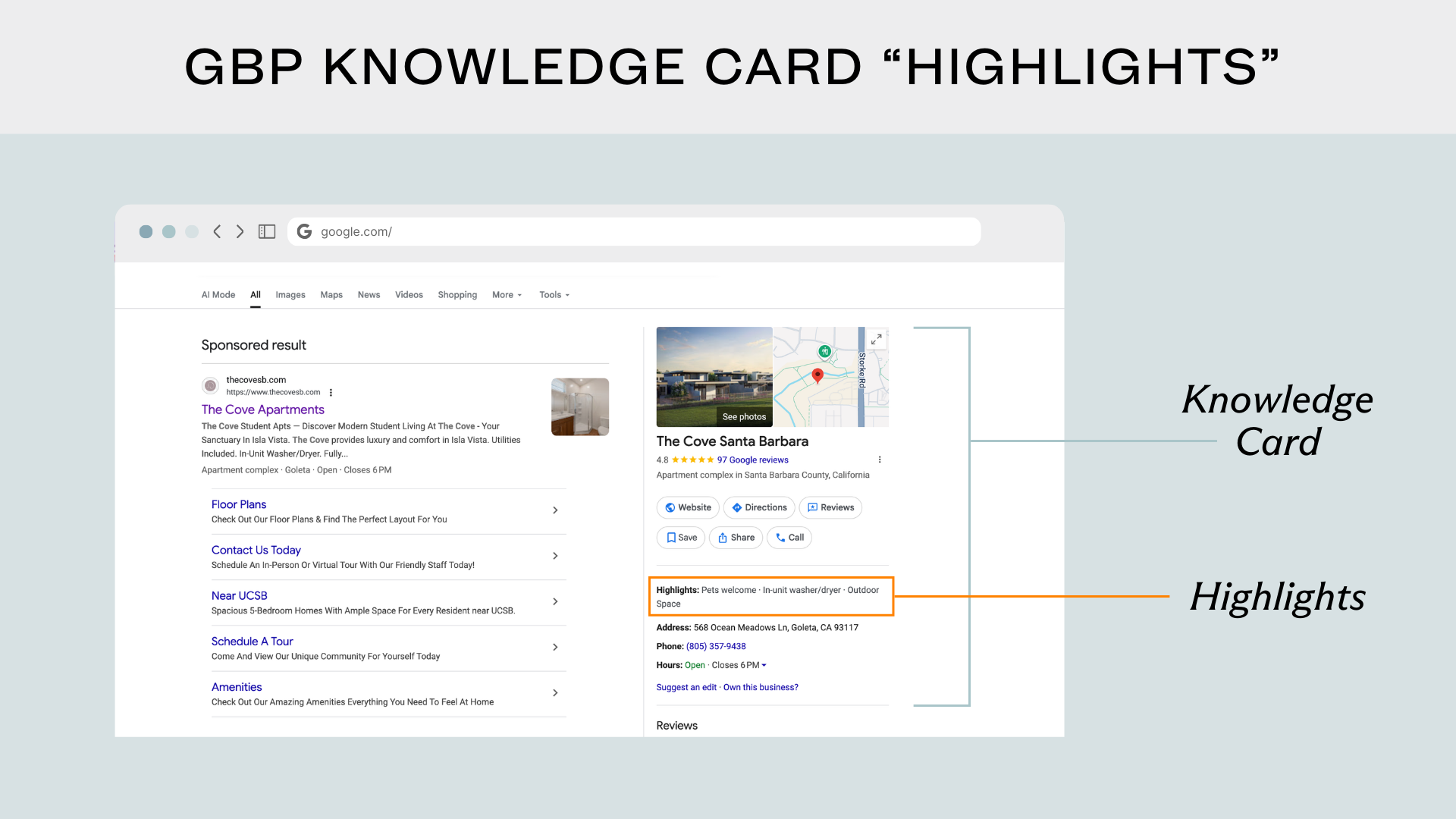
When a profile has these amenities listed, Google can show the “Highlights” feature on the knowledge card, which pulls out some of the selected amenities and displays them on the SERP.
Product cards (AKA floor plans)
In multifamily, this is the ideal location to showcase your floor plans and popular amenities. By treating each floor plan and top-tier amenity as a “product,” you can push high-value visual assets directly onto the main search results page.
While floor plans are the priority, we also recommend building cards for your top 3-5 amenities (e.g. “Rooftop Pool” or “24-Hour Gym”). On mobile devices, these cards occupy significant real estate, allowing a user to browse your unit mix and lifestyle perks without ever clicking through to your website.
To build an effective Product Catalog, organize your cards into logical categories (e.g. “Studio,” “1 Bedroom,” “2 Bedroom”) and ensure every card contains the following:
- Proper naming convention: Use clear names like “The A1 – 1 Bed / 1 Bath” or “Resort-Style Pool” rather than internal codes like “Unit 67.”
- Visual asset: Upload a high-resolution 2D or 3D floor plan image (tip: white backgrounds render best).
- Category: Assign it correctly so users can filter by unit type (e.g. 1 Bedroom, 2 Bedroom, Studio, Amenities, etc).
- Description: Include square footage and key selling points (e.g. “kitchen island, oversized closet”).
- Pricing: List the current starting price for units. For amenities, you can leave this blank. However, note that with recent legislation around all-in pricing transparency, it is acceptable to omit price and include a note in the description to “check website for up-to-date pricing.”
- Link to website: A direct link to that specific floor plan’s availability page on your site.
Google Business Profile posts
Google Posts allow you to publish short news updates, special offers, and events directly to your Knowledge Panel. While these do not directly boost your search ranking, a profile with recent posts shows prospective residents (and the Google algorithm) that your business is active and managed.
We recommend posting monthly. Use this space for high-impact announcements like rent specials and resident events.
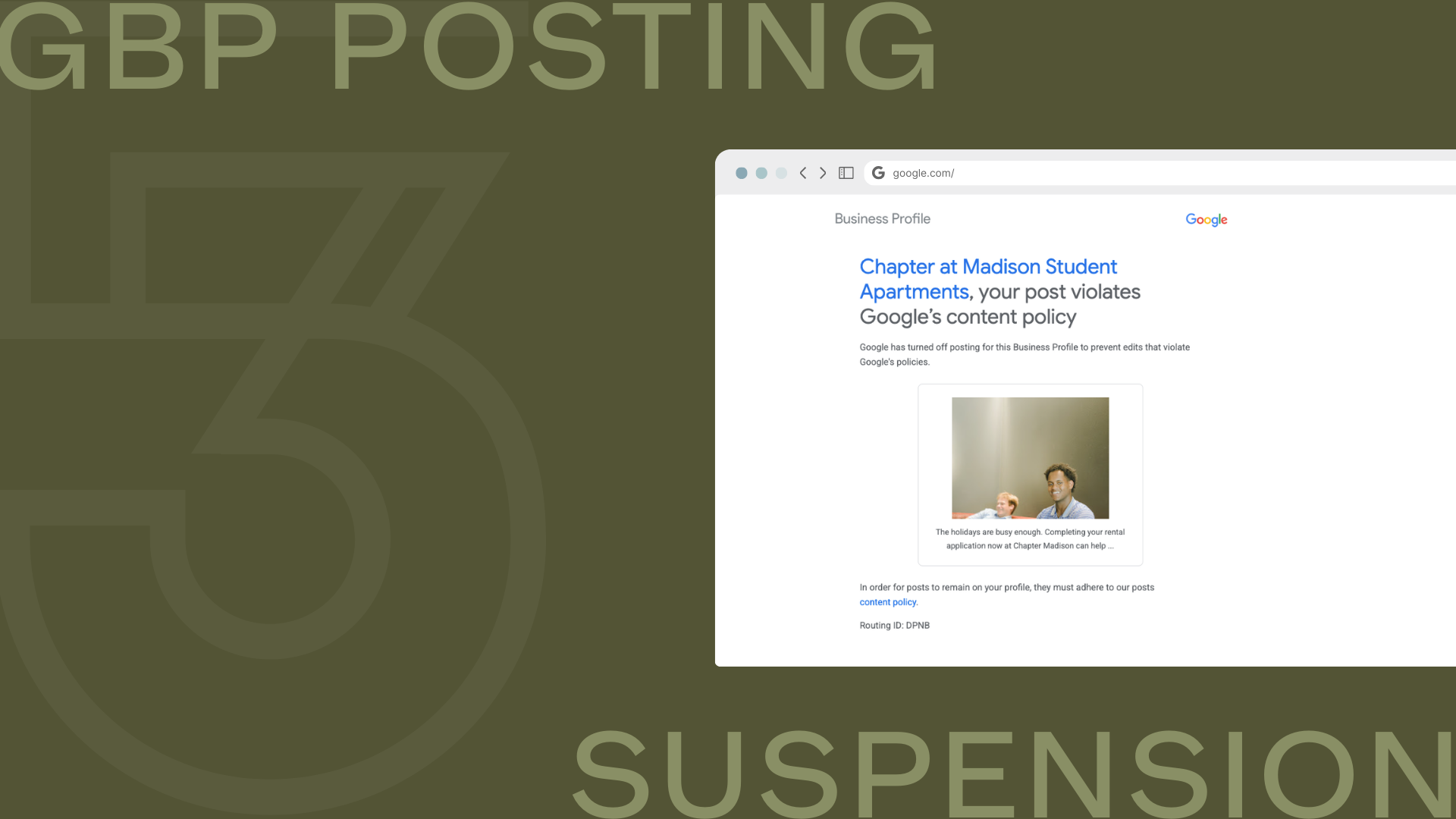
Google has recently tightened its spam filters regarding Post images.
- The image must focus on the business or the product.
- Do not use stock photography, and avoid images with heavy text overlays (like digital flyers). Google’s AI often flags these as “low quality” or spam, and repeated violations can get your posting privileges suspended.
- Stick to real, high-resolution photos of the community or your amenities.
Failure to comply with these guidelines can lead to penalties. We have seen profiles get their posting feature suspended for posts of the leasing team where the human is the focal point with no other indicators that it is a photo of the community.
Unlocking attribution: the 4 conversion points
Many marketers make the mistake of treating GBP traffic as a single bucket. To truly understand your conversion path — and to prove ROI to ownership — you have to track the four distinct click-points within the GBP ecosystem using unique UTM parameters.
To separate theory from reality, our team analyzed 200 multifamily websites over a 6-month period to see exactly how users interact with these links. The results revealed a stark hierarchy in performance. The Primary Website Link is the undisputed heavyweight, commanding 89.9% of all click volume and driving a massive 7.44% conversion rate (defined as a completed contact form, tour schedule, or application start).
Interestingly, while the Appointment Link captured the second-highest volume at 6.2% of traffic, it suffered from a significantly lower 0.93% conversion rate, highlighting a major friction point in the user journey. Google Posts generated negligible direct traffic (0.1%) and conversion (0.90%), serving primarily as an engagement signal rather than a lead driver.
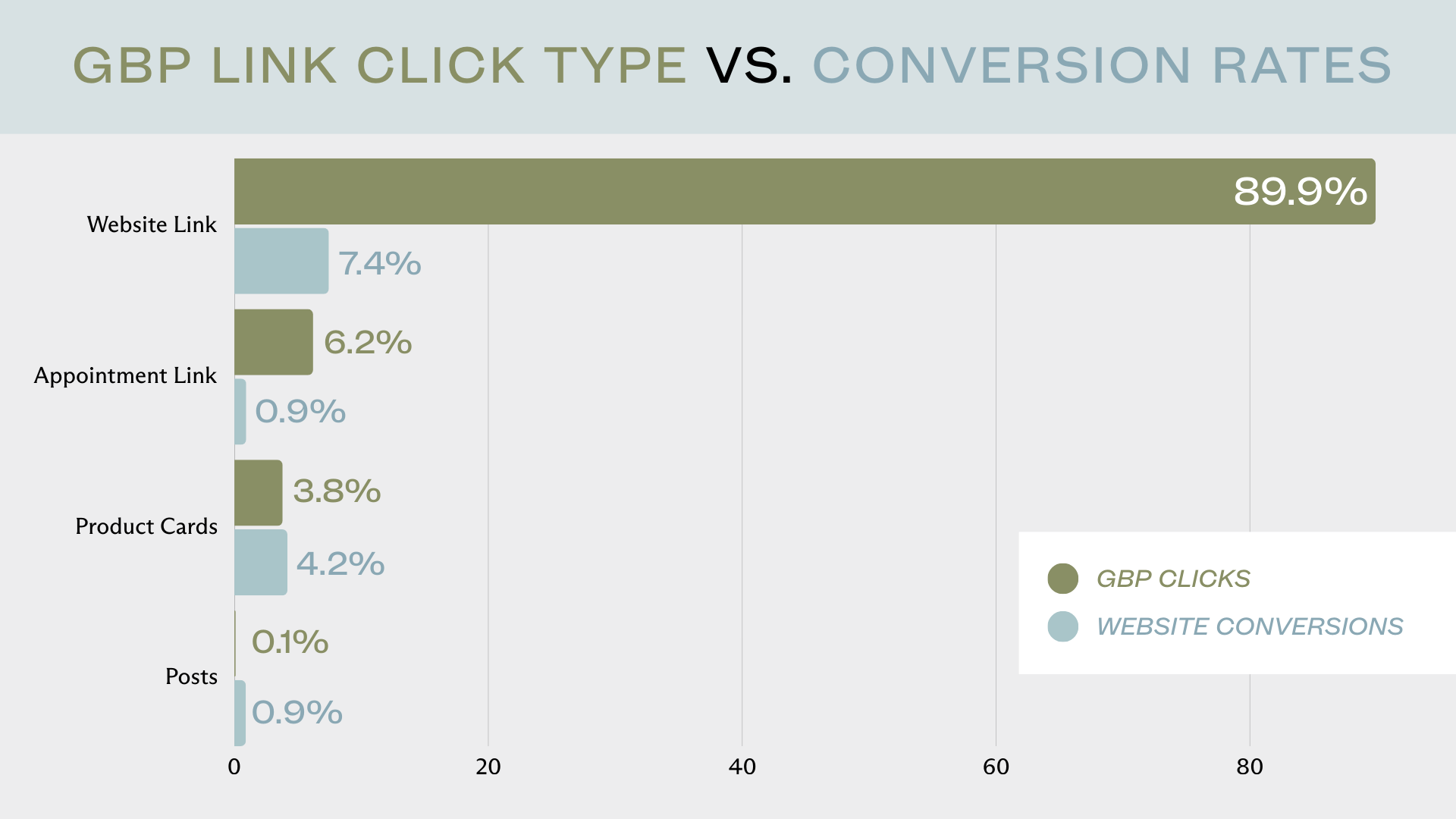
Based on this data, here is how you should strategize for each link:
1. The primary website link
With nearly 90% of traffic and the highest conversion rate, this confirms that most users still want the “full tour” experience of your website. Ensure this links to the specific property homepage (not a corporate directory) and that your mobile site speed is optimized, as this is where the bulk of your GBP leads land.
2. The appointment link
The gap between decent traffic (6.2%) and low conversion (0.93%) suggests friction. Users clicking “Appointments” have intent, but they are likely landing on a generic contact page or a slow-loading form. To boost this conversion rate, change this link to a direct deep-link that auto-triggers your tour scheduling widget (e.g. domain.com/?open_widget=true). Remove the obstacles between the click and the calendar.
3. Product card links
While low in volume, the strong conversion rate (4.18%) proves that users clicking on floor plans are “shoppers” who have already moved past the awareness phase. Link these cards directly to the specific availability page for that floor plan (e.g. /floorplans/1-bedroom) rather than the homepage.
4. Google post CTAs
Do not view Posts as a lead-generation tool. Their value is in the “freshness” signal (which is a minor indirect signal) they send to Google’s algorithm — not direct traffic. Keep posting for SEO health, but don’t measure success by click-throughs here. We recommend posting monthly; daily posting will not provide any more “freshness” than monthly and can be a waste of time for your team.
Reputation management
Your star rating is no longer just a vanity metric; it is a visibility gatekeeper. The behavior of search users, along with Voice Search assistants like Siri and Alexa, has shifted towards “Best” queries (e.g. “Best apartments in [City]”).
Google’s internal filter for “Best” defaults to businesses with a 4.0 rating or higher. If your property sits at a 3.9, you are effectively invisible to high-intent prospects searching for the “best” options in your market.
We often say reviews matter, but the math proves it. In our deep dive into reputation management strategy, we analyzed the relationship between star ratings and map visibility.
The findings were definitive: a community’s average star rating has a moderate negative correlation (r = −0.491) with its non-branded ranking position on Google.
This data confirms that as your star rating increases, your community’s visibility improves in the search results.
GBP is an ongoing asset
A static GBP is a dying profile. The days of “set it and forget it” are over. With the rise of AI search tools like ChatGPT and Google AI Overviews, your GBP is no longer just a map pin; it’s your reputable source of truth.
For multi-site portfolios, the challenge isn’t knowing what to do. It’s execution. Standardization of categories, rigorous verification protocols, and consistent link tracking are what separate top-performing operators from the rest of the pack.
If you suspect your portfolio is suffering from “Category Confusion,” worry it’s invisible to the “Best of” filters, or you simply need help untangling a web of duplicate listings, our team can help.
Contact our team today to talk about your community’s GBP strategy.

Sign up for our newsletter.
Stay in the know about our insights and industry trends.
